Autonomous AI Agents for Web3
Autonomous AI Agents for Web3
This project for represents my early entry in Autonomous AI Agents and Web3 Infrastructure. Designing for an era before "AI Agents" became a household term, I created a high-transparency interface that bridged the gap between complex blockchain transactions and human-led commands.
Focus Area :
AI Agent Orchestration, Transaction Transparency, and MVP Rapid Prototyping.
Core Objective :
To design a functional MVP that allows users to deploy autonomous AI agents to perform complex technical tasks on the blockchain.
Brief Context
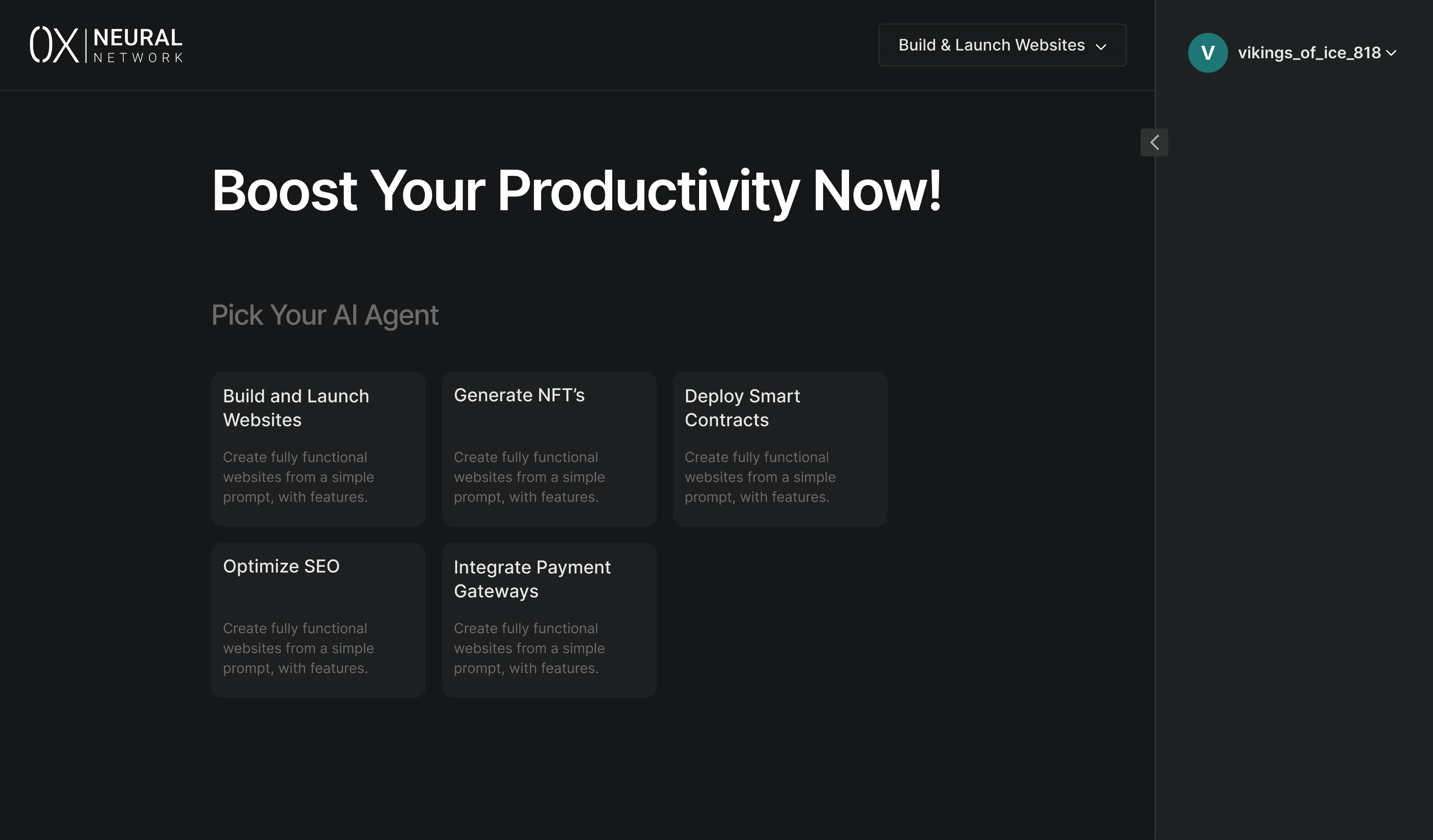
0x Neural Network was designed to act as a "Super-App" for Web3 automation. Users could select one of five specialized agents: Website Builder, NFT Generator, Smart Contract Deployer, SEO Optimizer, or Payment Integrator.
The primary design challenge was Transparency. Because agents work autonomously in the background, users often feel disconnected from the process.
My goal was to design an "Agent Workbench" that displayed every granular step of the backend process—from Docker image creation to LLM calls—in real-time.
Challenges
The "Wait" UX :
AI and Blockchain processes are not instantaneous. I had to design a way to keep users engaged while the agent was "thinking" or waiting for a node response.
Complex Technical Logs :
Translating raw developer data (Docker pushes, Compute deployments, Token transfers) into a UI that a non-technical user could monitor without feeling overwhelmed.
Clarifying the Loop :
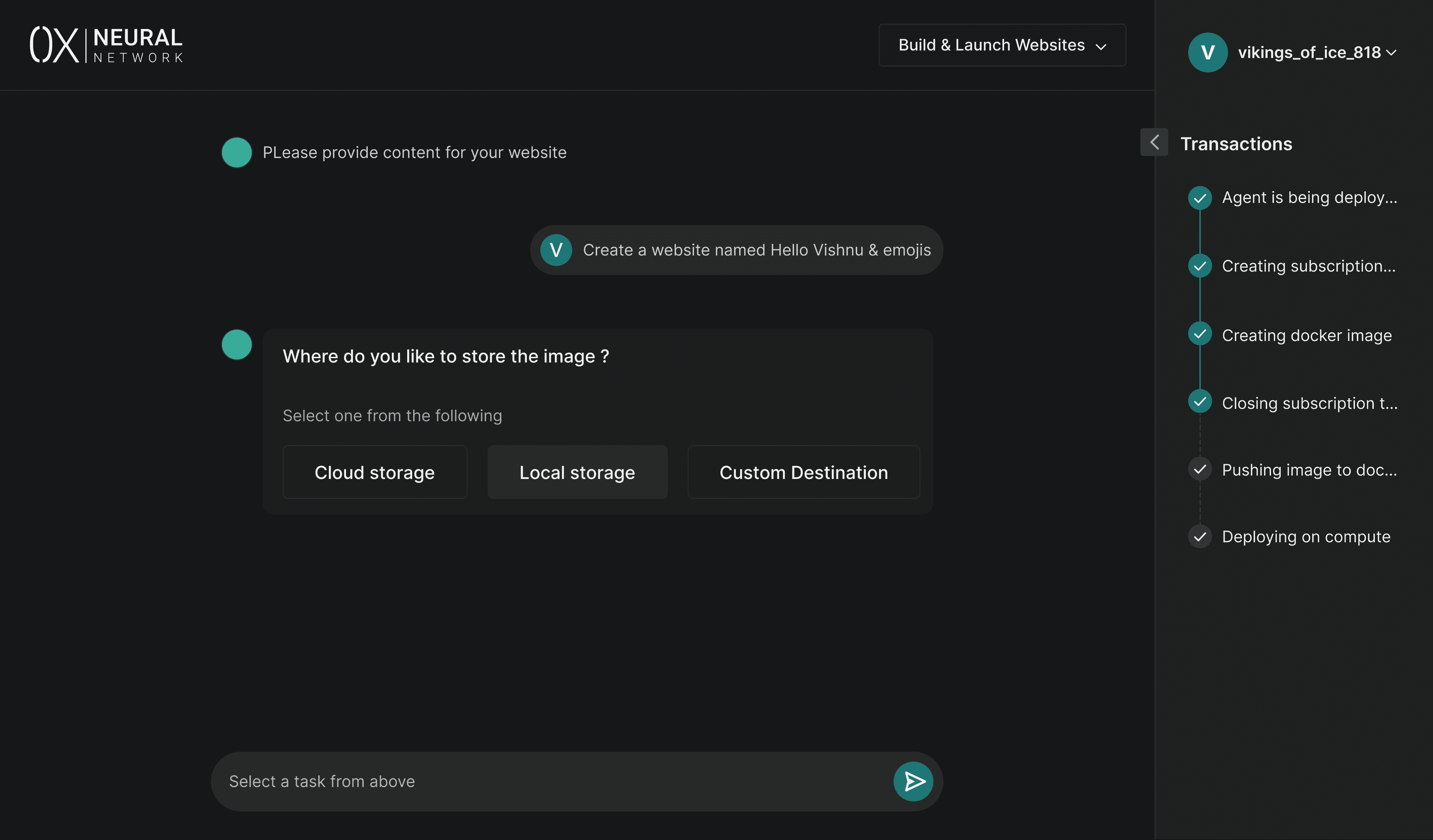
Agents occasionally hit a "decision fork" (e.g., choosing a storage destination). I needed to design a seamless way for the agent to pause, ask the user a question, and resume work without breaking the flow.
Extreme Rapid Prototyping :
The entire MVP had to be designed in just 5–6 days to validate the concept for the consulting team and provide a roadmap for the developers.
Design Approach
The Dual-Pane Agent Workbench
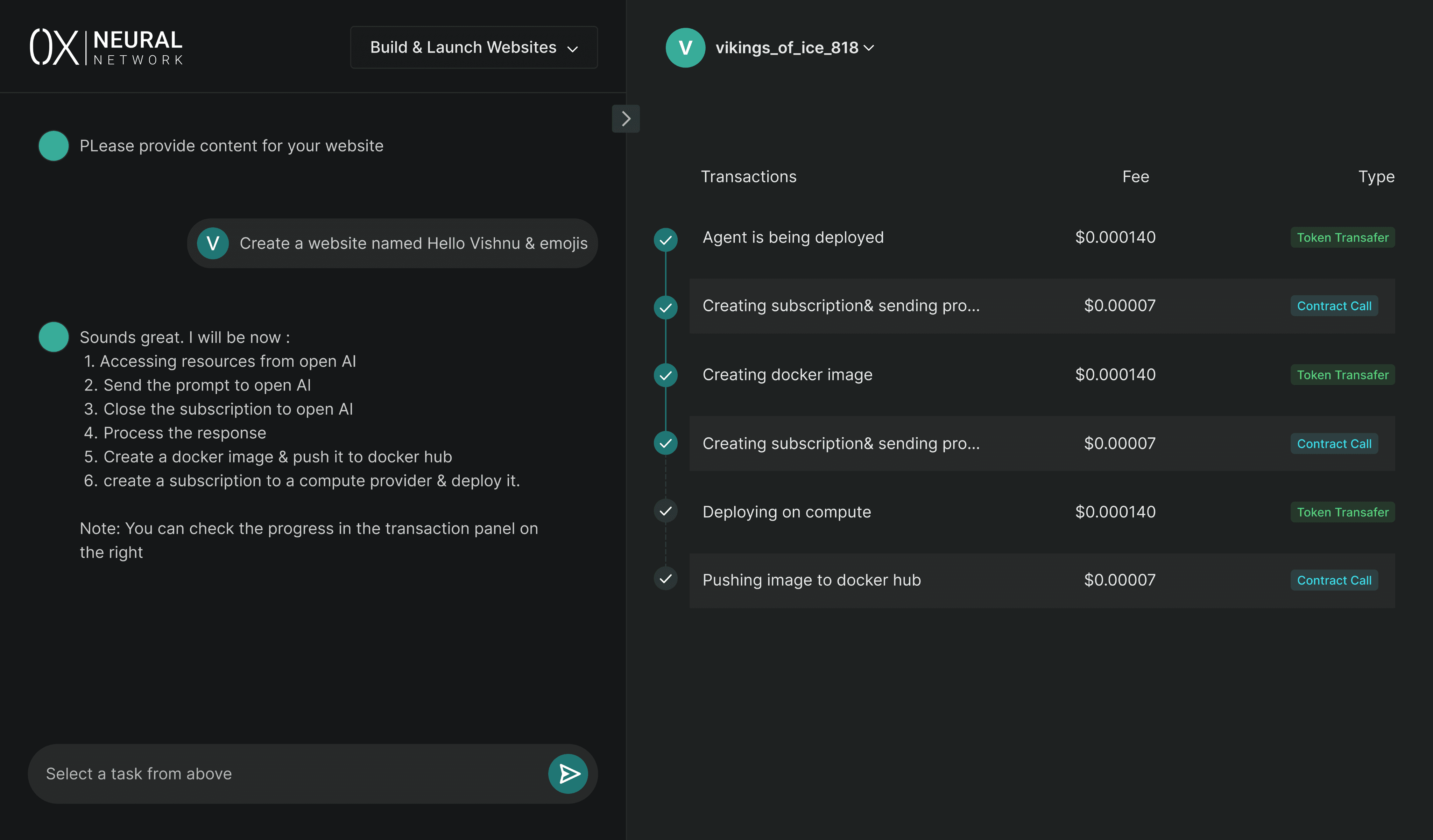
I designed a split-view interface to handle the dual nature of AI agents:
Left Pane (The Conversation/Selection): Where users choose their agent and interact with the AI (e.g., selecting DALL-E vs. Llama, or naming their project).
Right Pane (The Transaction Ledger): A live-scrolling log of every backend action. This included the fee charged for each contract call and the specific type of transaction, giving users full financial and technical visibility.
State-Aware Progress Tracking
To manage the "Latency Problem," I implemented specific status indicators:
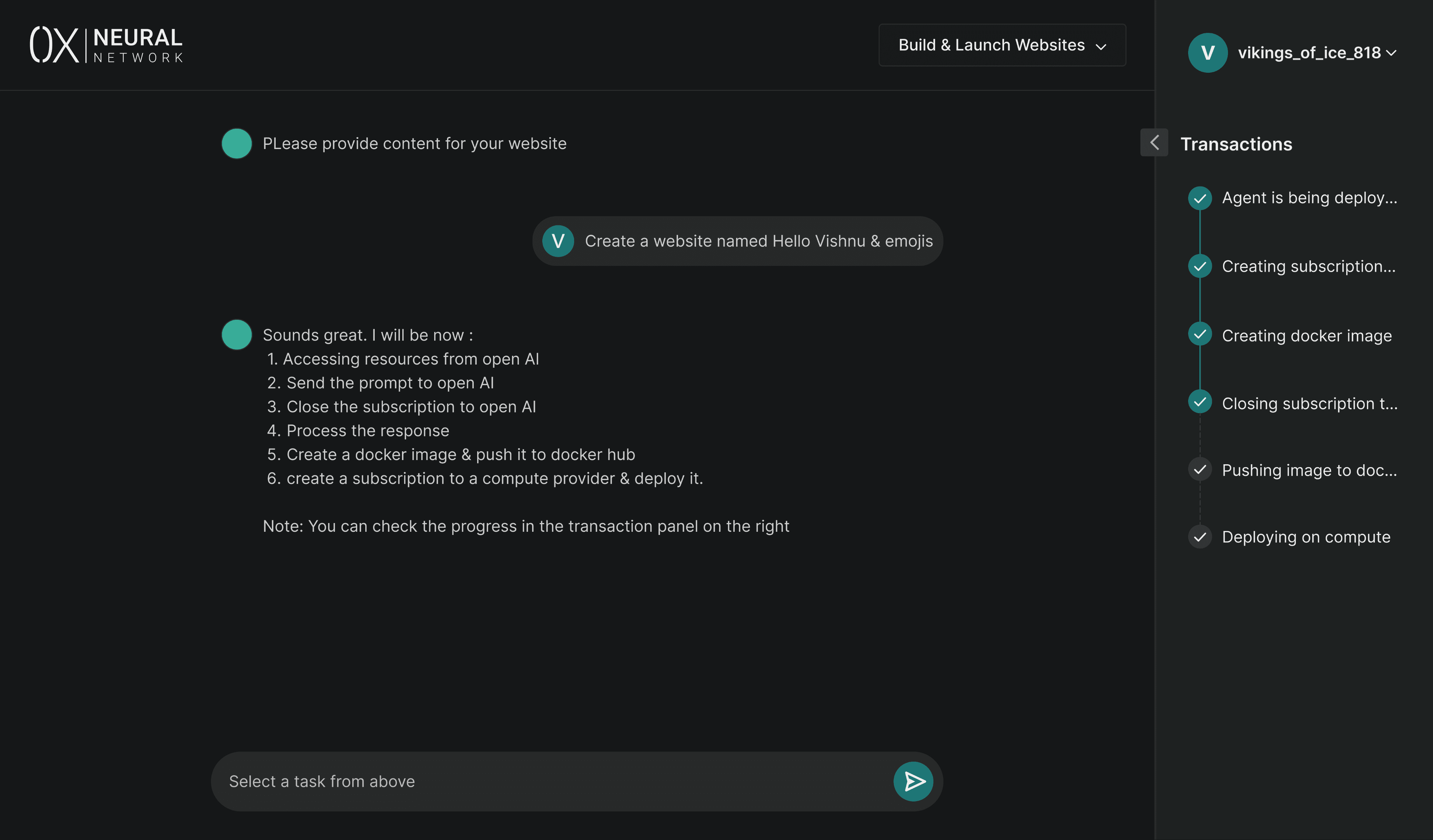
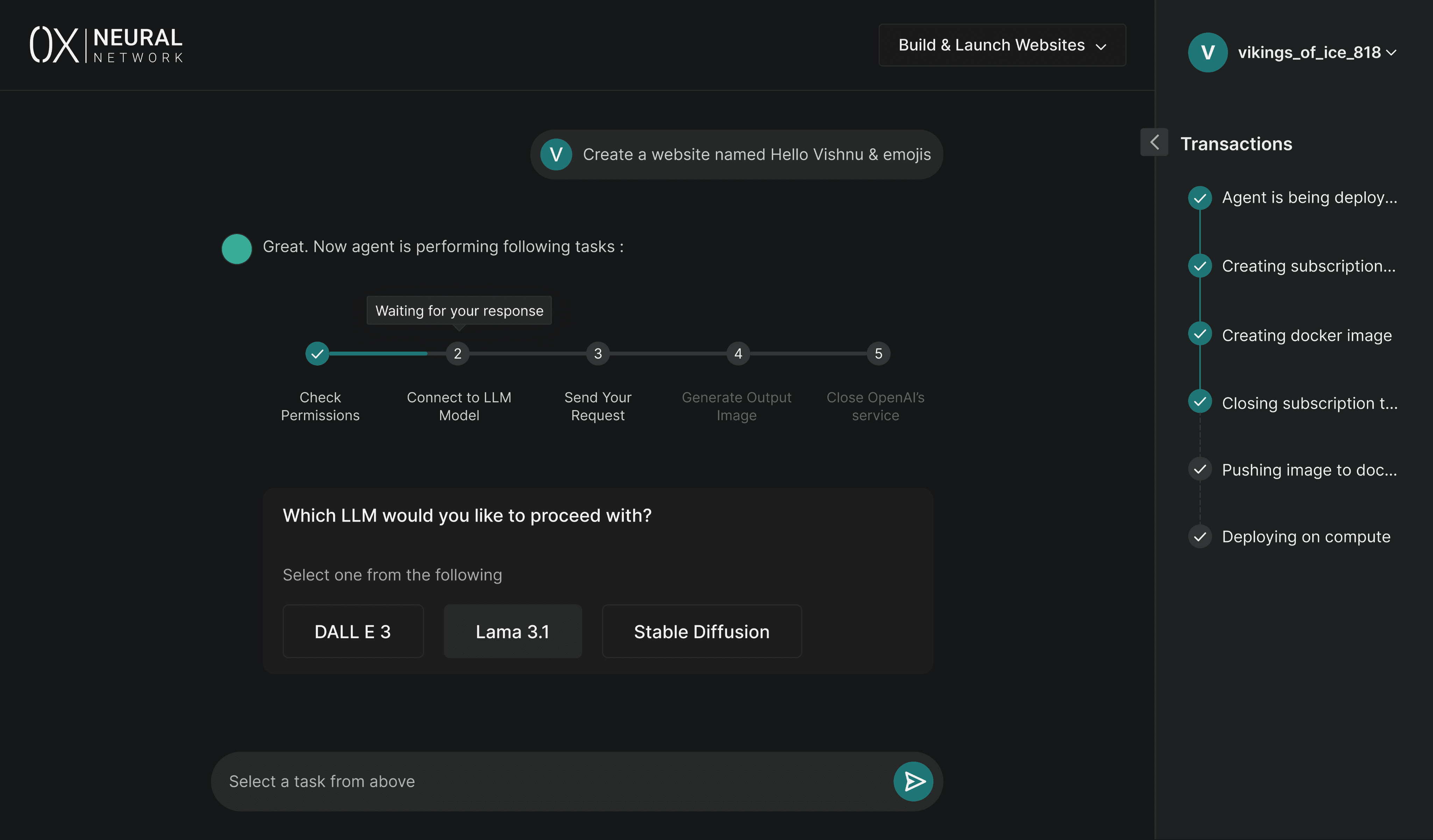
Visual Steppers : Every task (e.g., "Creating Docker Image") featured a status icon.
Intelligent Tooltips: If a task was taking longer than usual, I added tooltips explaining the "Why"—for example: "Waiting for response from the LLM service." This lowered user anxiety during the 0-to-1 processing phase.
Solutions
Agent Decision Forks :
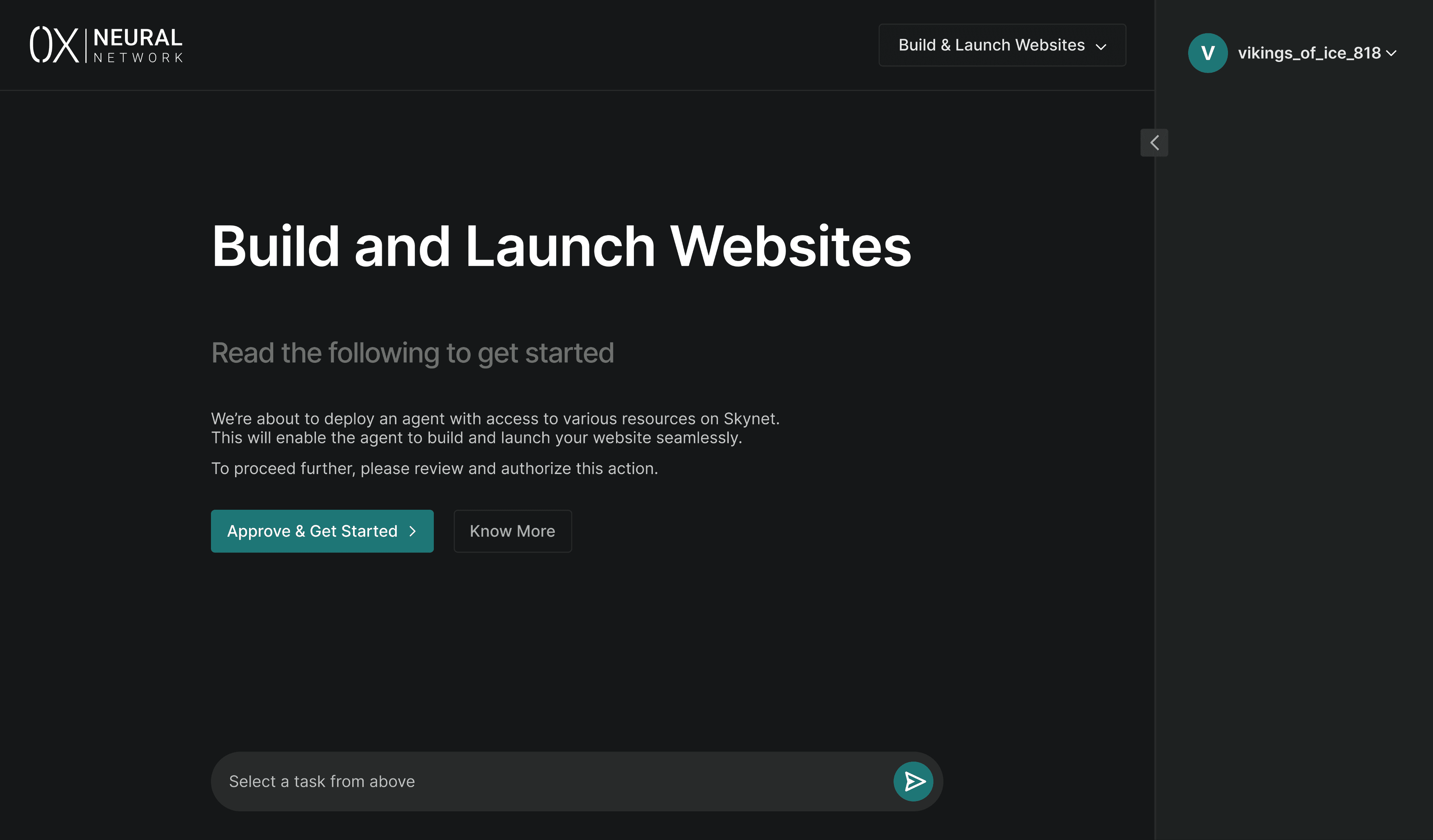
I designed specialized input modals that appeared when the agent needed a decision (e.g., "Select Cloud vs. Local Storage"). This made the user feel like a "Project Manager" overseeing an expert worker.
Transaction Breakdown :
Each transaction in the log was clickable, revealing the Gas Fee, Transaction Type, and Hash, ensuring that the Web3 aspect of the tool was transparent and auditable.
Multi-Model Flexibility :
I built selectors for different LLM engines (DALL-E, Stable Diffusion, etc.), allowing the user to customize the "brain" of their agent based on their specific quality and cost requirements.
Key Learnings
Validating the Concept :
Despite the 6-day timeline, the design was robust enough for the consulting team to approve the product for further development, successfully validating the market for Web3 AI agents.
Designing for Non-Linear Flows :
I learned that AI UX is rarely a straight line. Designing for "Clarification Questions" taught me how to handle interruptions in a programmatic workflow.
Transparency as a Feature :
I realized that in Web3/AI, the "Log" is not just for developers—it’s a trust-building feature for the user. Seeing the agent "Check Permissions" or "Close OpenAI Service" makes the technology feel safer and more reliable.
Early-Career Agility :
This project proved my ability to digest complex, futuristic tech concepts (like Docker compute on-chain) and turn them into a user-friendly MVP under a high-pressure deadline.
Brief Context
0x Neural Network was designed to act as a "Super-App" for Web3 automation. Users could select one of five specialized agents: Website Builder, NFT Generator, Smart Contract Deployer, SEO Optimizer, or Payment Integrator.
The primary design challenge was Transparency. Because agents work autonomously in the background, users often feel disconnected from the process.
My goal was to design an "Agent Workbench" that displayed every granular step of the backend process—from Docker image creation to LLM calls—in real-time.
Challenges
The "Wait" UX :
AI and Blockchain processes are not instantaneous. I had to design a way to keep users engaged while the agent was "thinking" or waiting for a node response.
Complex Technical Logs :
Translating raw developer data (Docker pushes, Compute deployments, Token transfers) into a UI that a non-technical user could monitor without feeling overwhelmed.
Clarifying the Loop :
Agents occasionally hit a "decision fork" (e.g., choosing a storage destination). I needed to design a seamless way for the agent to pause, ask the user a question, and resume work without breaking the flow.
Extreme Rapid Prototyping :
The entire MVP had to be designed in just 5–6 days to validate the concept for the consulting team and provide a roadmap for the developers.
Design Approach
The Dual-Pane Agent Workbench
I designed a split-view interface to handle the dual nature of AI agents:
Left Pane (The Conversation/Selection): Where users choose their agent and interact with the AI (e.g., selecting DALL-E vs. Llama, or naming their project).
Right Pane (The Transaction Ledger): A live-scrolling log of every backend action. This included the fee charged for each contract call and the specific type of transaction, giving users full financial and technical visibility.
State-Aware Progress Tracking
To manage the "Latency Problem," I implemented specific status indicators:
Visual Steppers : Every task (e.g., "Creating Docker Image") featured a status icon.
Intelligent Tooltips: If a task was taking longer than usual, I added tooltips explaining the "Why"—for example: "Waiting for response from the LLM service." This lowered user anxiety during the 0-to-1 processing phase.
Solutions
Agent Decision Forks :
I designed specialized input modals that appeared when the agent needed a decision (e.g., "Select Cloud vs. Local Storage"). This made the user feel like a "Project Manager" overseeing an expert worker.
Transaction Breakdown :
Each transaction in the log was clickable, revealing the Gas Fee, Transaction Type, and Hash, ensuring that the Web3 aspect of the tool was transparent and auditable.
Multi-Model Flexibility :
I built selectors for different LLM engines (DALL-E, Stable Diffusion, etc.), allowing the user to customize the "brain" of their agent based on their specific quality and cost requirements.
Key Learnings
Validating the Concept :
Despite the 6-day timeline, the design was robust enough for the consulting team to approve the product for further development, successfully validating the market for Web3 AI agents.
Designing for Non-Linear Flows :
I learned that AI UX is rarely a straight line. Designing for "Clarification Questions" taught me how to handle interruptions in a programmatic workflow.
Transparency as a Feature :
I realized that in Web3/AI, the "Log" is not just for developers—it’s a trust-building feature for the user. Seeing the agent "Check Permissions" or "Close OpenAI Service" makes the technology feel safer and more reliable.
Early-Career Agility :
This project proved my ability to digest complex, futuristic tech concepts (like Docker compute on-chain) and turn them into a user-friendly MVP under a high-pressure deadline.

Vineeत्
