AI-Powered Career & Placement Prep
AI-Powered Career & Placement Prep
This case study represents my most comprehensive work to date, showcasing your ability to design a dual-sided platform (B2B & B2C) that balances the high-pressure needs of college placement offices with the personal career anxieties of students.
Focus Area :
MVP Strategy, User Onboarding, and Error Prevention Logic
Core Objective :
To create an end-to-end career readiness platform that uses AI to automate resume building and conduct realistic interview simulations, while providing colleges with data-driven oversight of student performance.
Brief Context
TruSkill identified a massive friction point in the Indian education system: students have the degrees, but lack the "Interview Stamina" and "Resume Precision" required for high-tier placements. Applically was conceived not just as a tool, but as a simulated ecosystem.
My goal was to design a platform that could scale from a single user practicing in a dorm to a University Dean managing 5,000 students across 10 different engineering branches.
Challenges
Designing the "Proof of Value" Loop :
major challenge was ensuring that college deans didn't just buy the software but felt its impact daily. I had to design a dashboard that constantly surfaced the "TruSkill Value," making our worth visible through real-time improvements in student readiness.
The "Black Box" AI Problem :
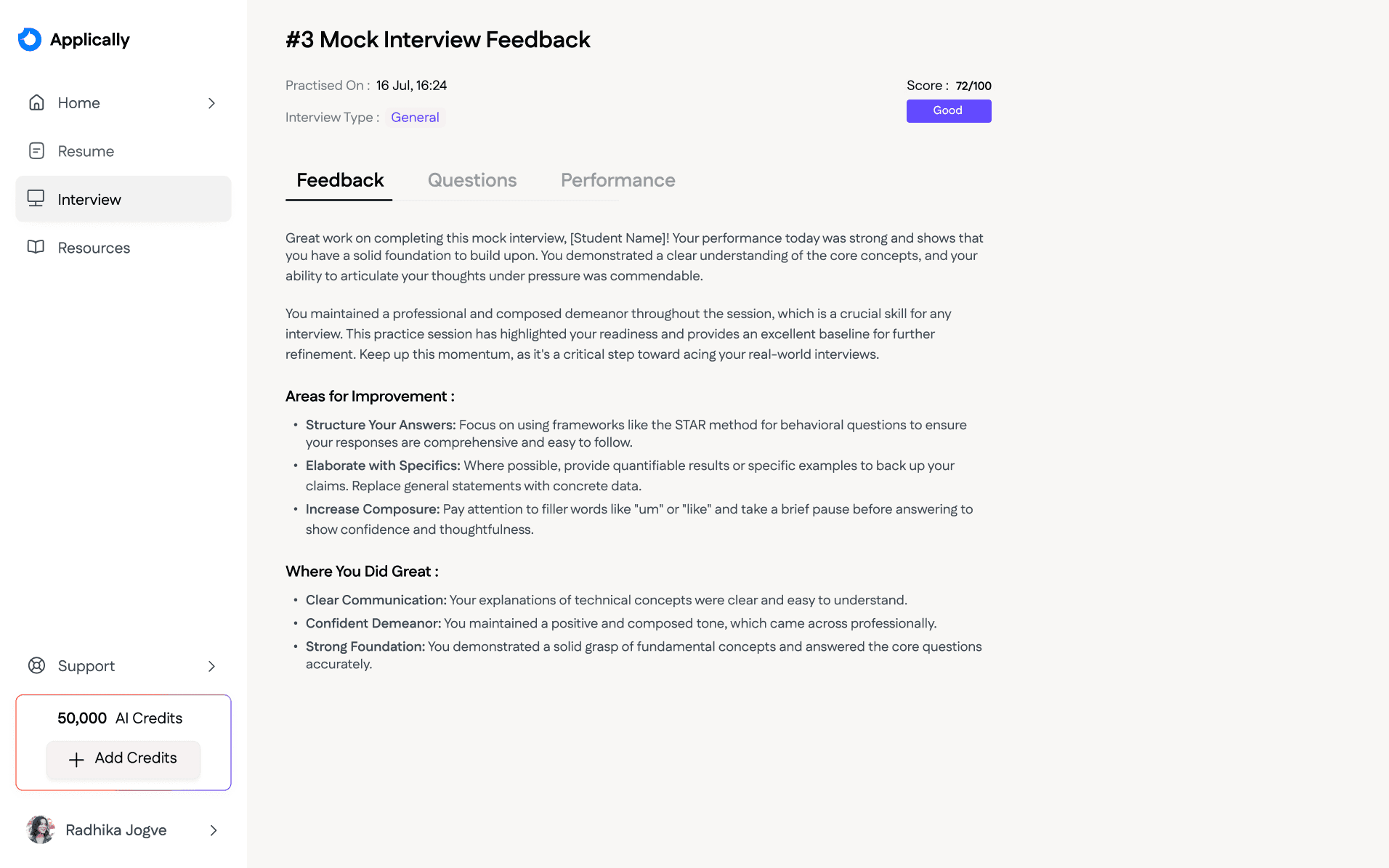
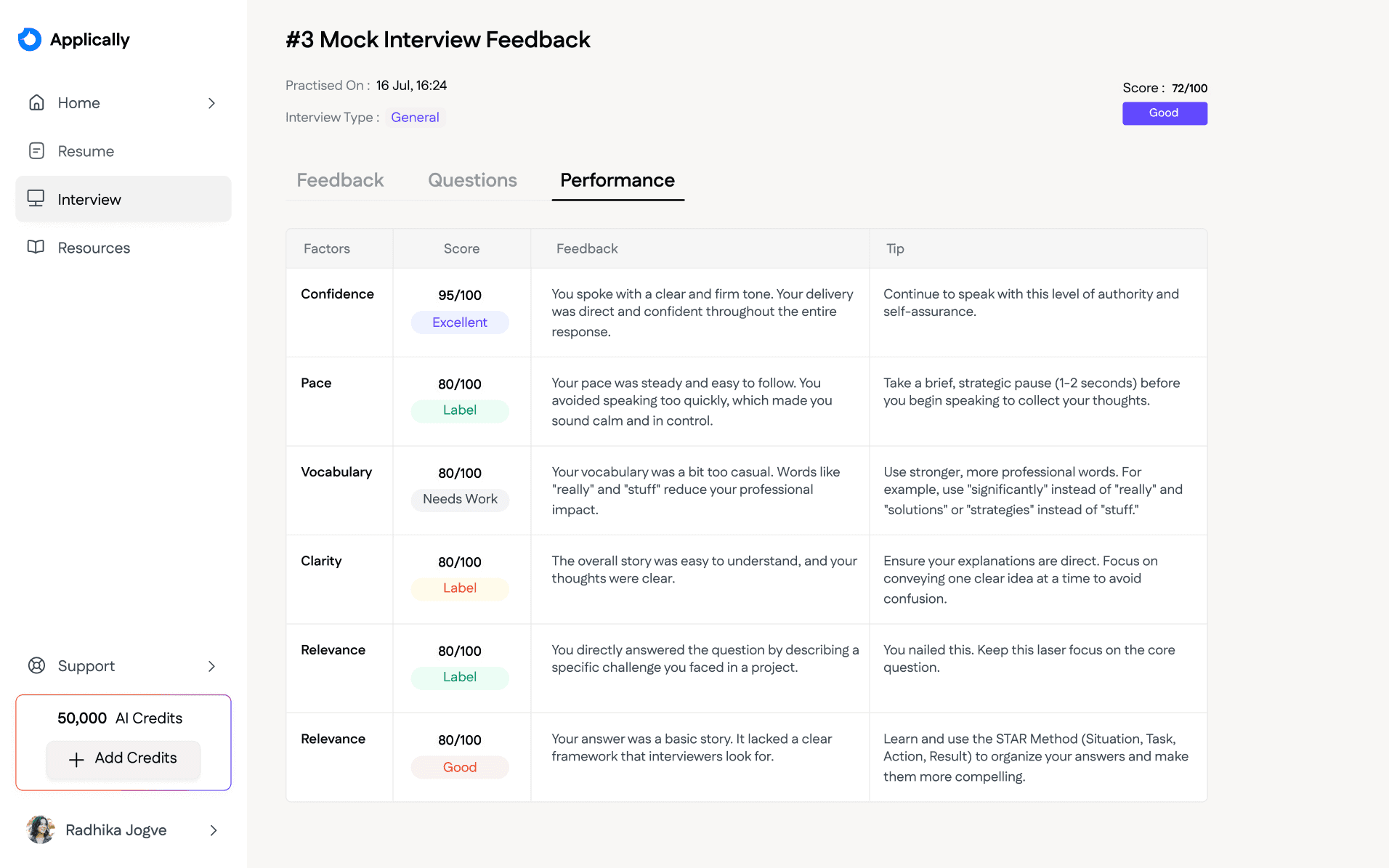
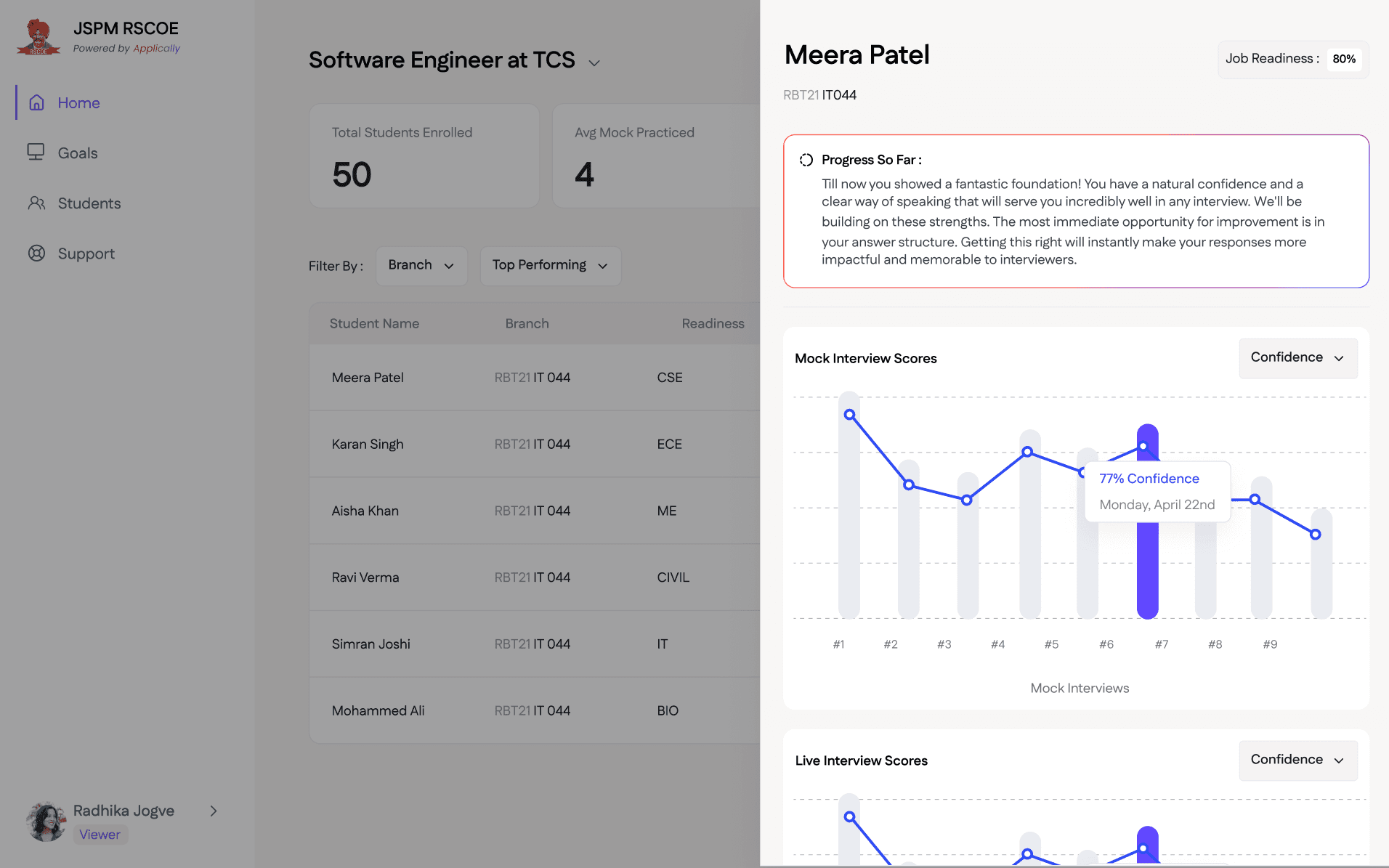
Users often distrust AI feedback if they don't understand the "Why." I had to design a transparent feedback UI that didn't just give a score (e.g., 7/10) but broke it down into actionable pillars like Confidence, JD Alignment, and Grammatical Accuracy.
Architecting for Multi-Tenancy (B2B Scalability) :
Since we were selling to multiple colleges, the challenge was designing a global dashboard that could be white-labeled. I had to ensure that a Placement Officer at "College A" could never see data from "College B," while maintaining a unified Super-Admin view for our internal team.
Credit Friction vs. Business Logic :
Live interviews are resource-heavy. I had to design a "Smart Gate" system that prevented students from wasting expensive live credits until they had reached a certain "Readiness Score" in the free/low-cost mock interviews.
Bridging the Engagement Gap (Student Anxiety) :
Designing for students in a high-stress "placement season" meant the UI couldn't just be functional, it had to be encouraging.
Design Approach
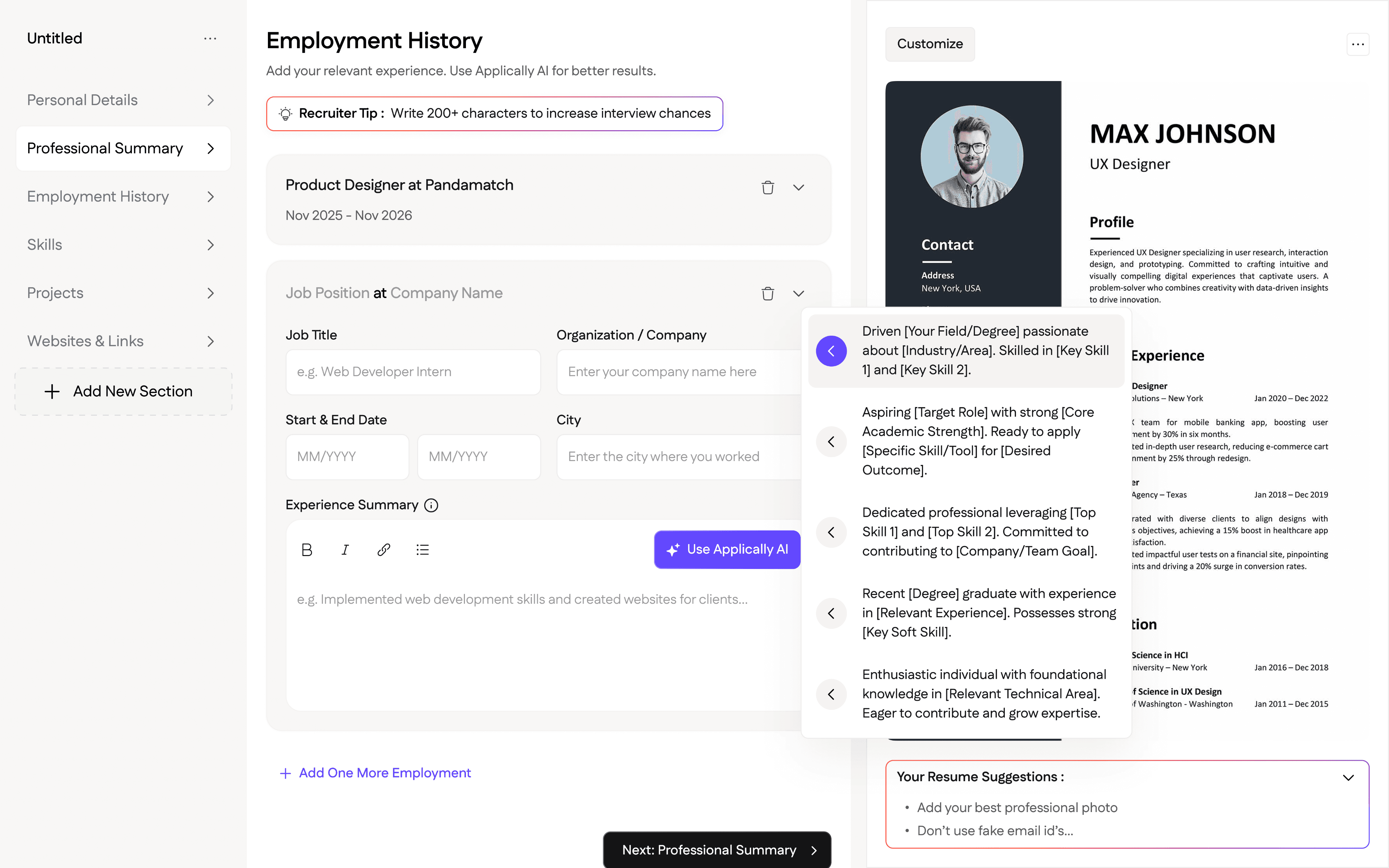
AI-Assisted Resume Sculpting
We realized that the biggest hurdle in resume building isn't the layout—it’s the content.
I implemented a library of AI-generated bullet points focusing on "Quantifiable Achievements." Students could select a baseline point and the AI would help them customize it with their specific numbers.
The platform transitioned from a tool you use to a partner that tells you what to write, lowering the barrier for students who struggle with self-branding.
Interview Simulations
To manage backend costs and user anxiety, I designed a two-tiered interview system:
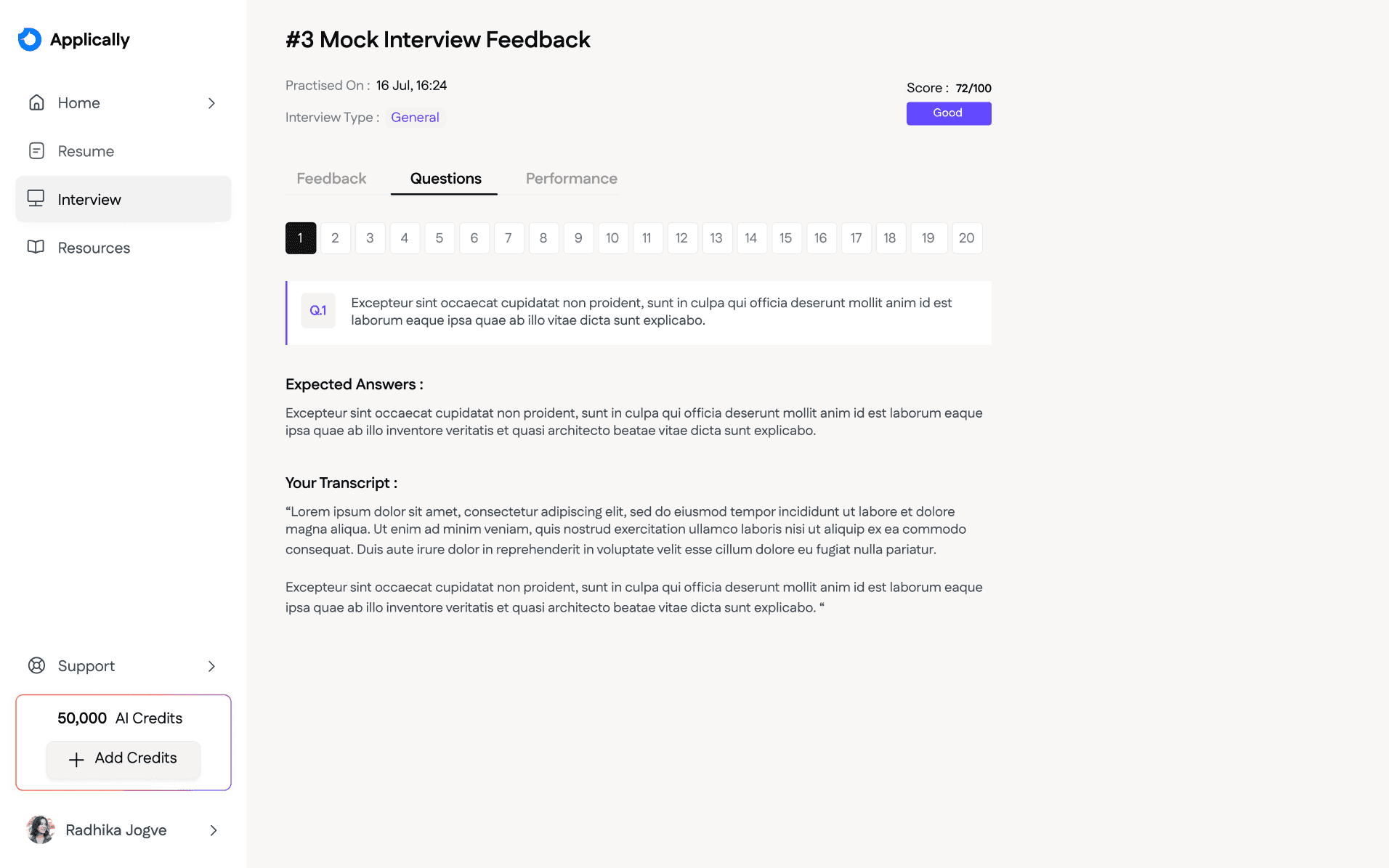
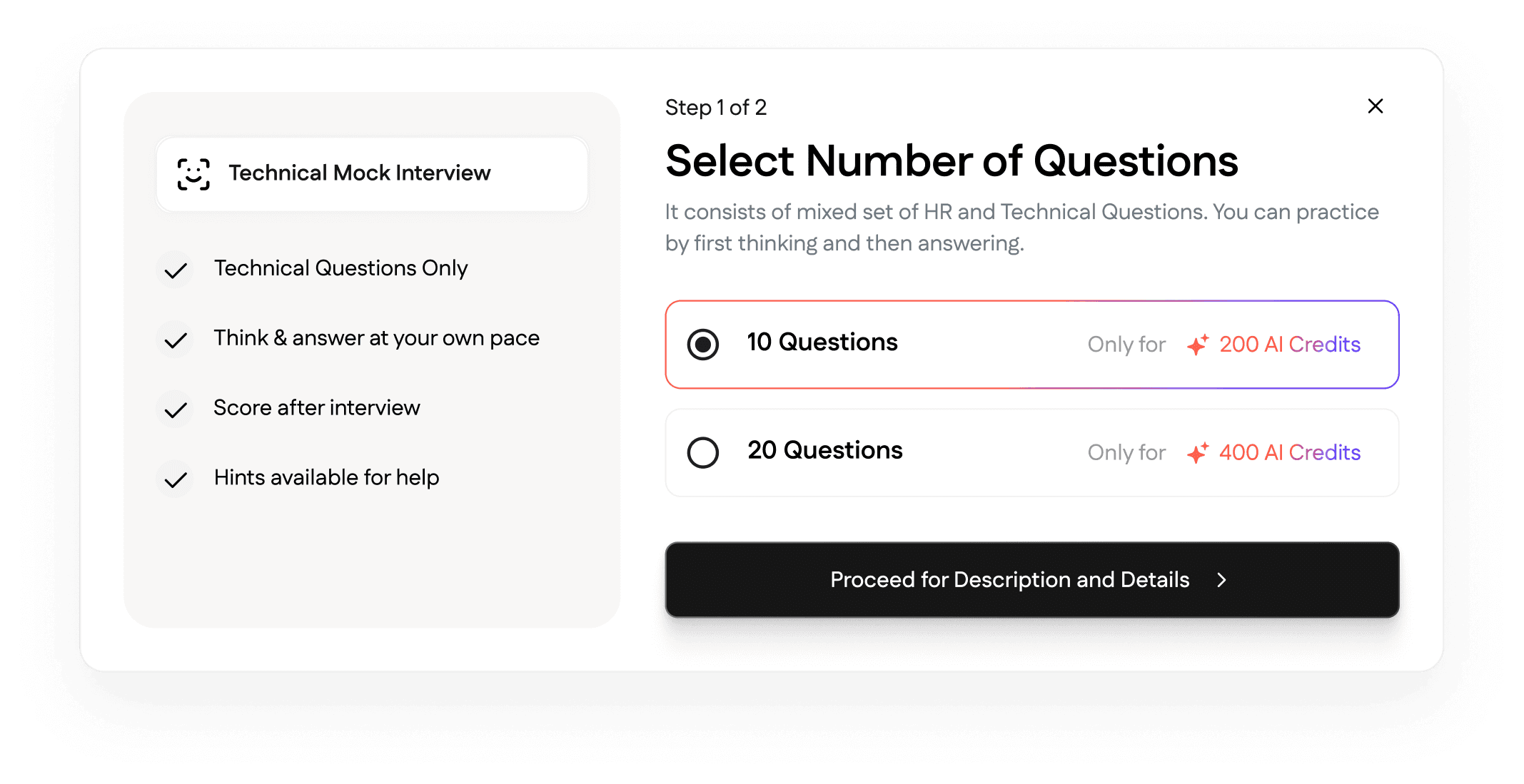
Mock Interviews (Low Friction): A "think-then-record" format that used fewer credits. I designed this as a training ground where users could see the question and respond when ready. This builds the "muscle memory" of answering.
Live Interviews (High Stakes): A real-time, AI-interactive session that simulated the pressure of a real interview.
JD-Tailored Questioning: I designed a flow where users upload a specific Job Description. The AI doesn't just ask general questions; it extracts "Required Skills" from the JD and grills the student on those specific gaps.
Readiness Scoring: After interview sessions, I designed a "Personalized Feedback Dashboard" that analyzed metrics like confidence, technical accuracy, and JD alignment. I implemented a numbering system (#1 Live, #2 Mock) to help users track their linear progress through an MVP-friendly interface.
Proving ROI through Analytics
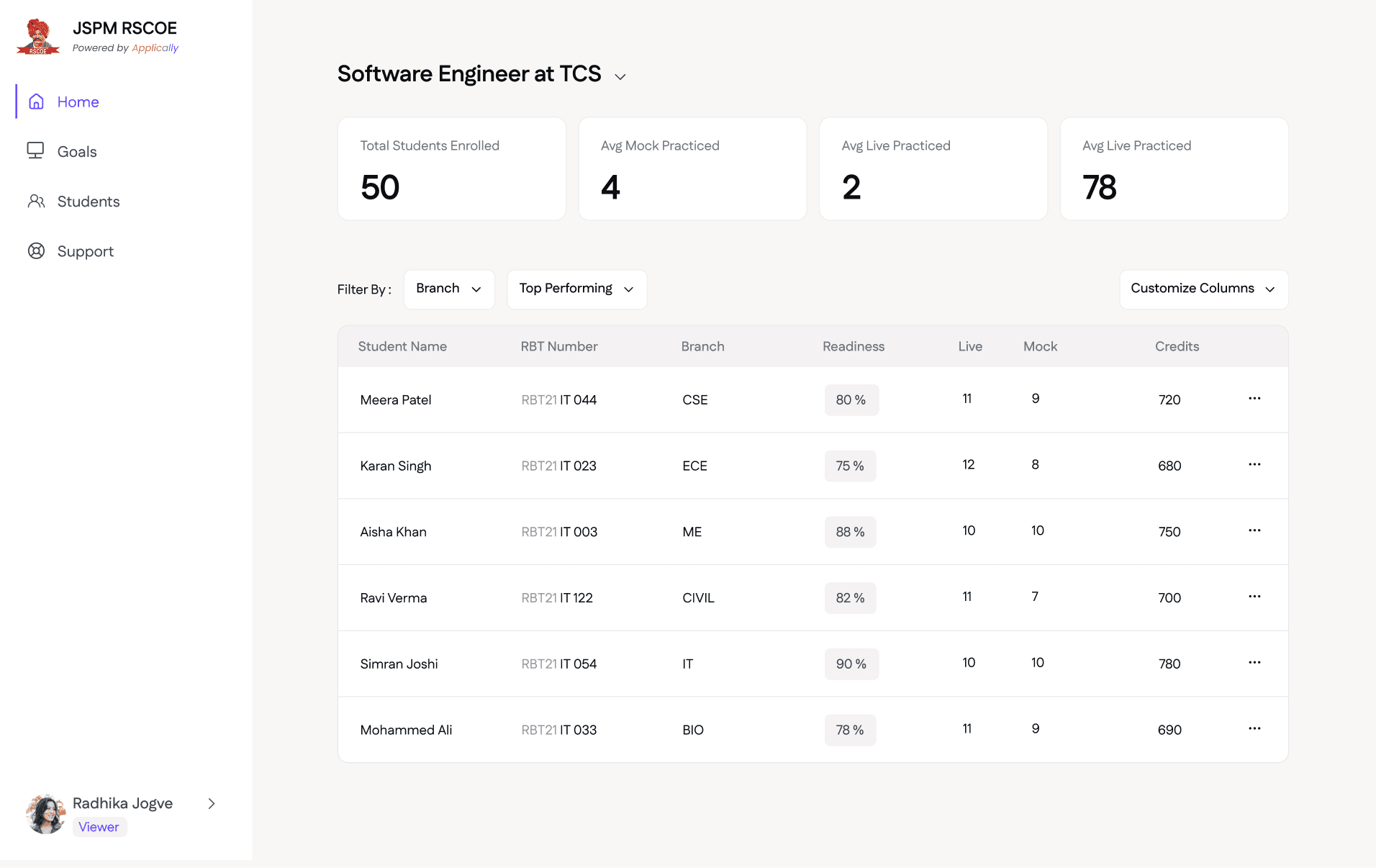
Colleges need to see the "Value Add" to justify the software cost. I designed the Admin Dashboard for college admin to highlight:
Placement Readiness: An aggregate "Readiness Score" for each and every student.
Students Activity: Total resumes created vs. interviews practiced by students.
Top Performer Identification: Identifying "Placement-Ready" students based on AI-analyzed interview scores.
Credit Management & Targeted Placement
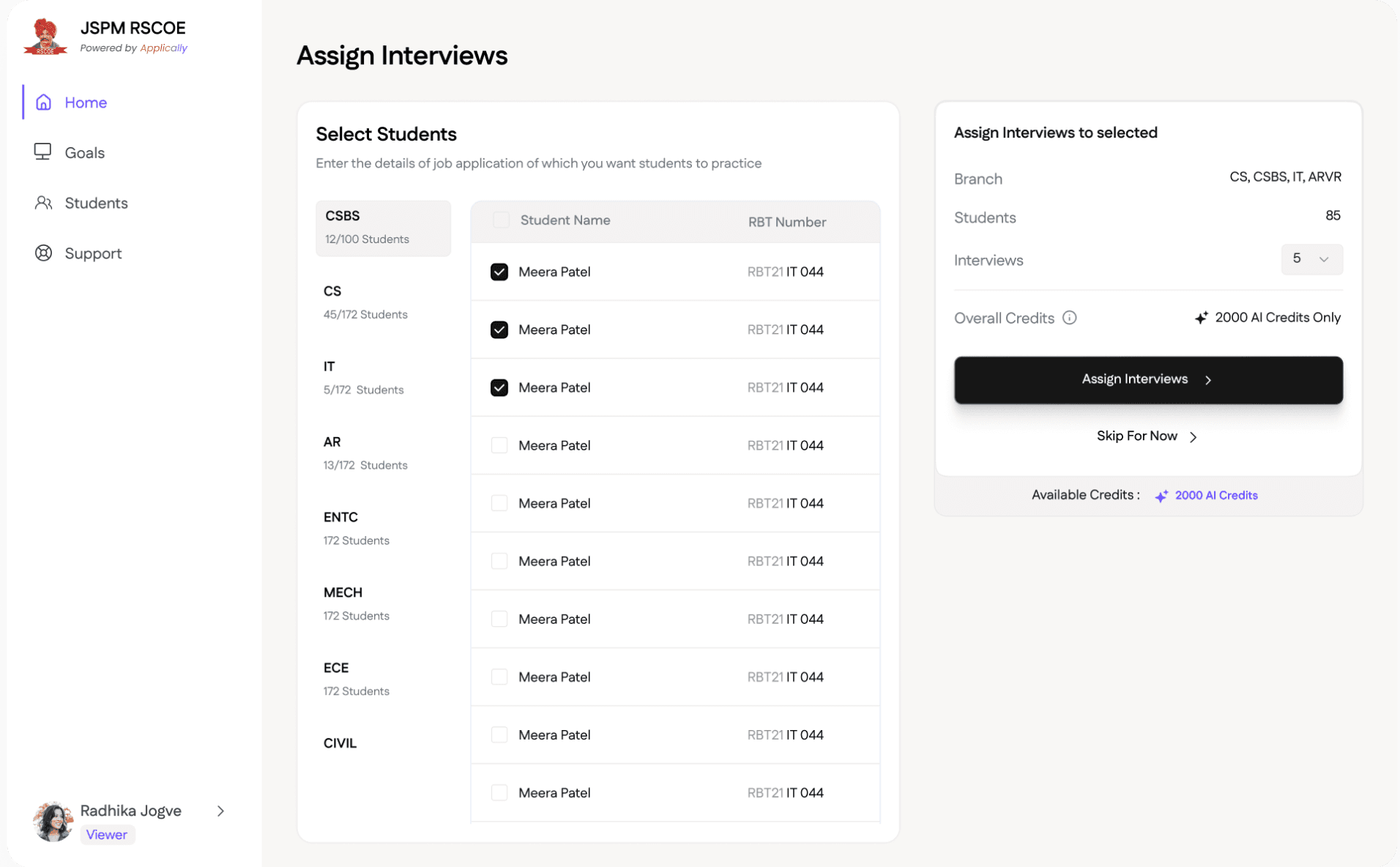
Colleges have limited budgets. I designed a Granular Assignment System that allowed administrators to:
Batch-Specific Goals: Create an "Amazon Prep" interview goal and assign it specifically to CS/IT students, preventing credit waste on irrelevant departments (e.g., Civil/Mechanical) for that specific drive.
White-Label Feeling: I prioritized the College's brand identity, giving their logo more visual weight than Applicly’s, making the platform feel like a proprietary resource owned by the institution.
Data-Driven Placement Strategy
For colleges, "Placements" is their biggest marketing metric. I designed an Executive Command Center that turns student activity into "Placement Intelligence."
The Readiness Matrix: A high-level scatter plot I designed that categorizes students into "Placement Ready," "Needs Polish," and "At Risk" based on their AI interview scores.
Granular Student Audits: Administrators can click into any student profile to see their "Interview Timeline." I designed a visualization showing their progress from Interview #1 to #10, proving that the platform is actually improving their confidence over time.
Scaling Support
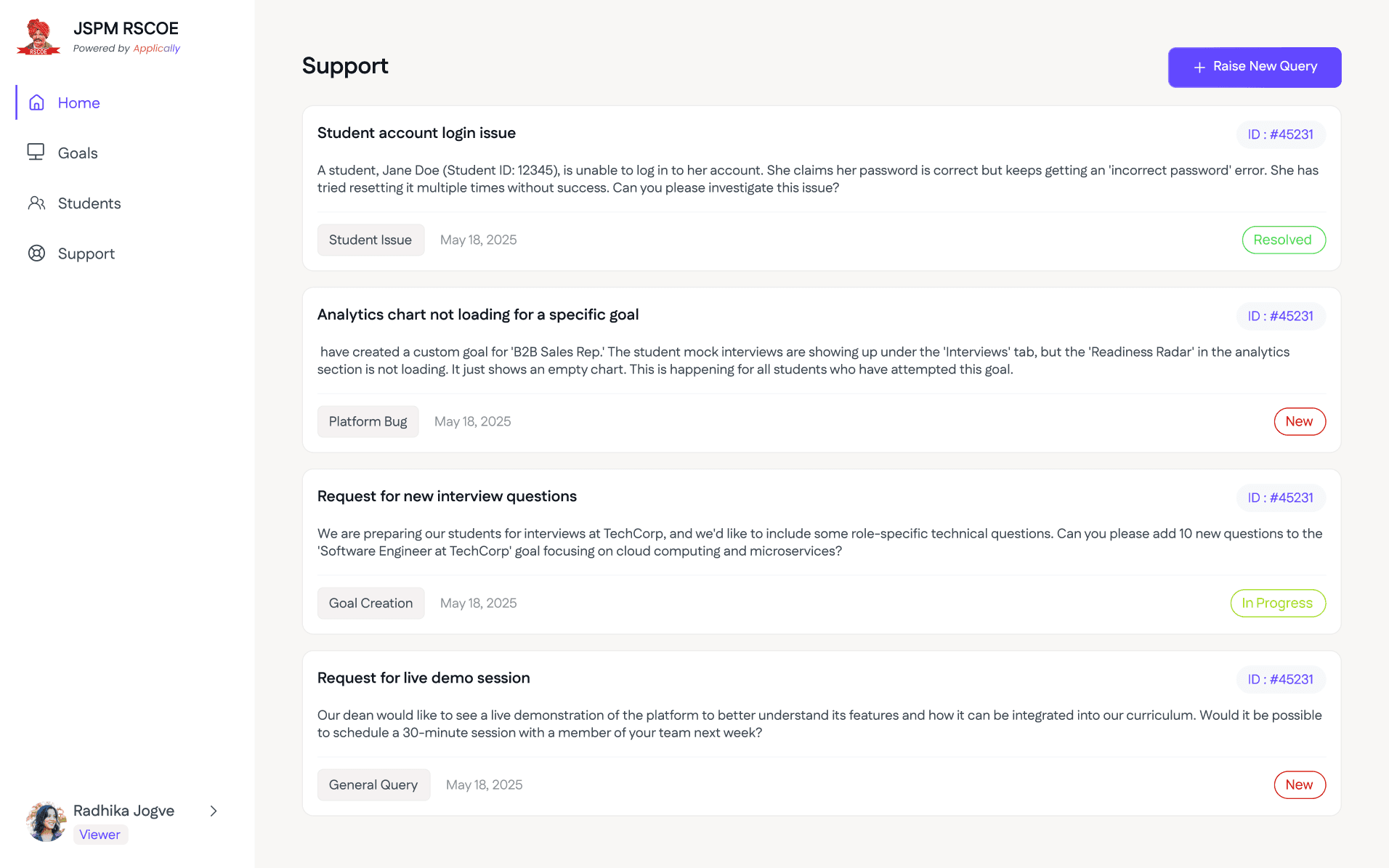
To reduce TruSkill's internal support load, I designed a Client Support Panel within the college dashboard. This allowed administrators to log queries and track tickets directly, ensuring we could manage multiple institutions without a constant reliance on phone calls.
Solutions
The Path to Readiness :
I designed the UX to be "Goal-Oriented." A user doesn't just "take an interview"; they enter a Job Description (JD), and the AI builds a "Path" of tailored questions.
The Landing Page :
I designed the full product landing page, focusing on the bridge between "Education" and "Employment," using a clean, modern aesthetic.
Feedback Visualization :
I designed a "Radar Chart" for post-interview analysis. It measured five pillars: Technical Knowledge, Communication, Confidence, Body Language, and JD Alignment. This gave students a "Level Up" feeling similar to a video game.
The Support Ecosystem :
I designed an Integrated Ticketing System for colleges. Instead of an external email, I built a "Support Tab" where deans could report technical glitches or request credit top-ups, which were then funneled into our Super-Admin panel for 1-click resolution.
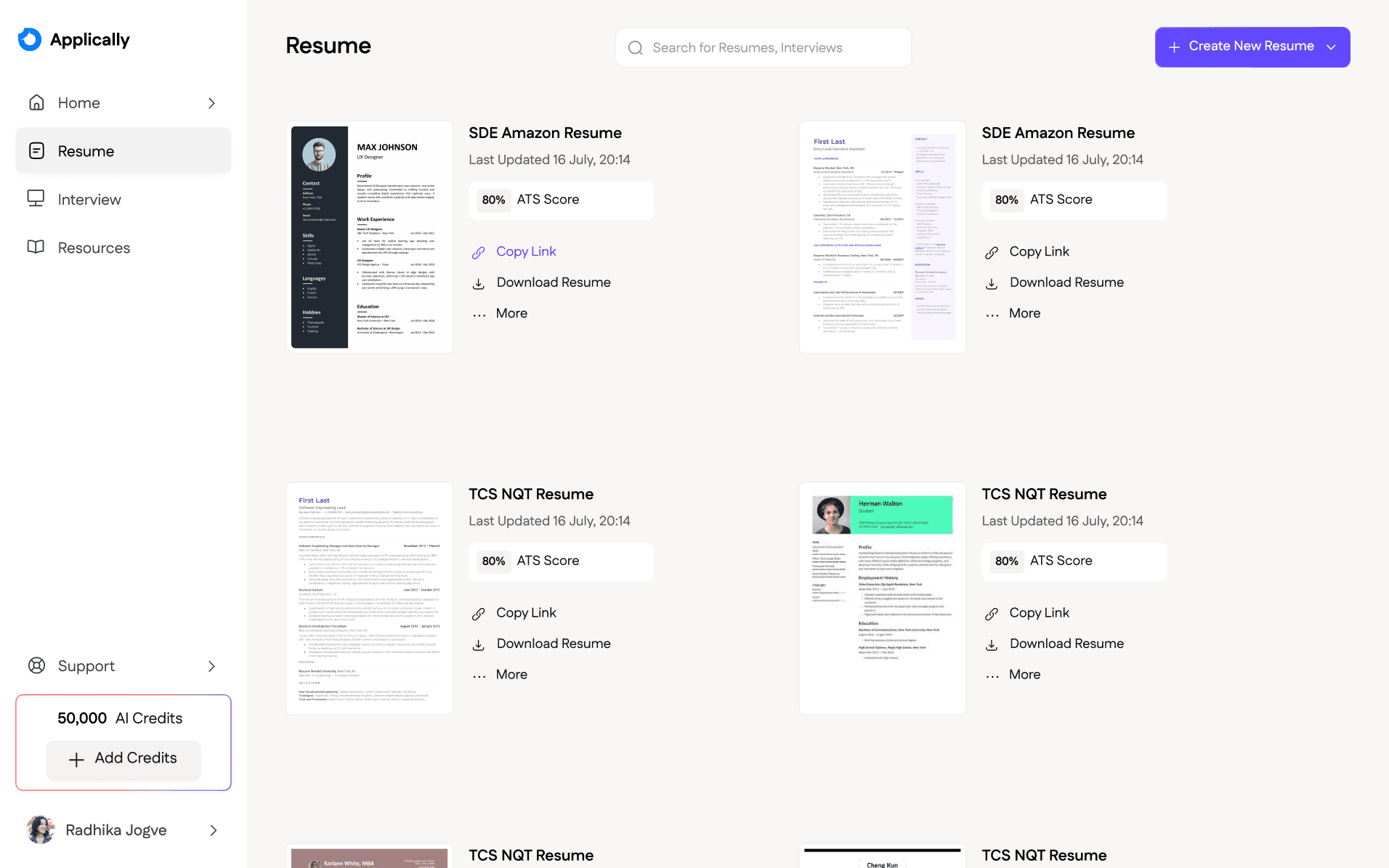
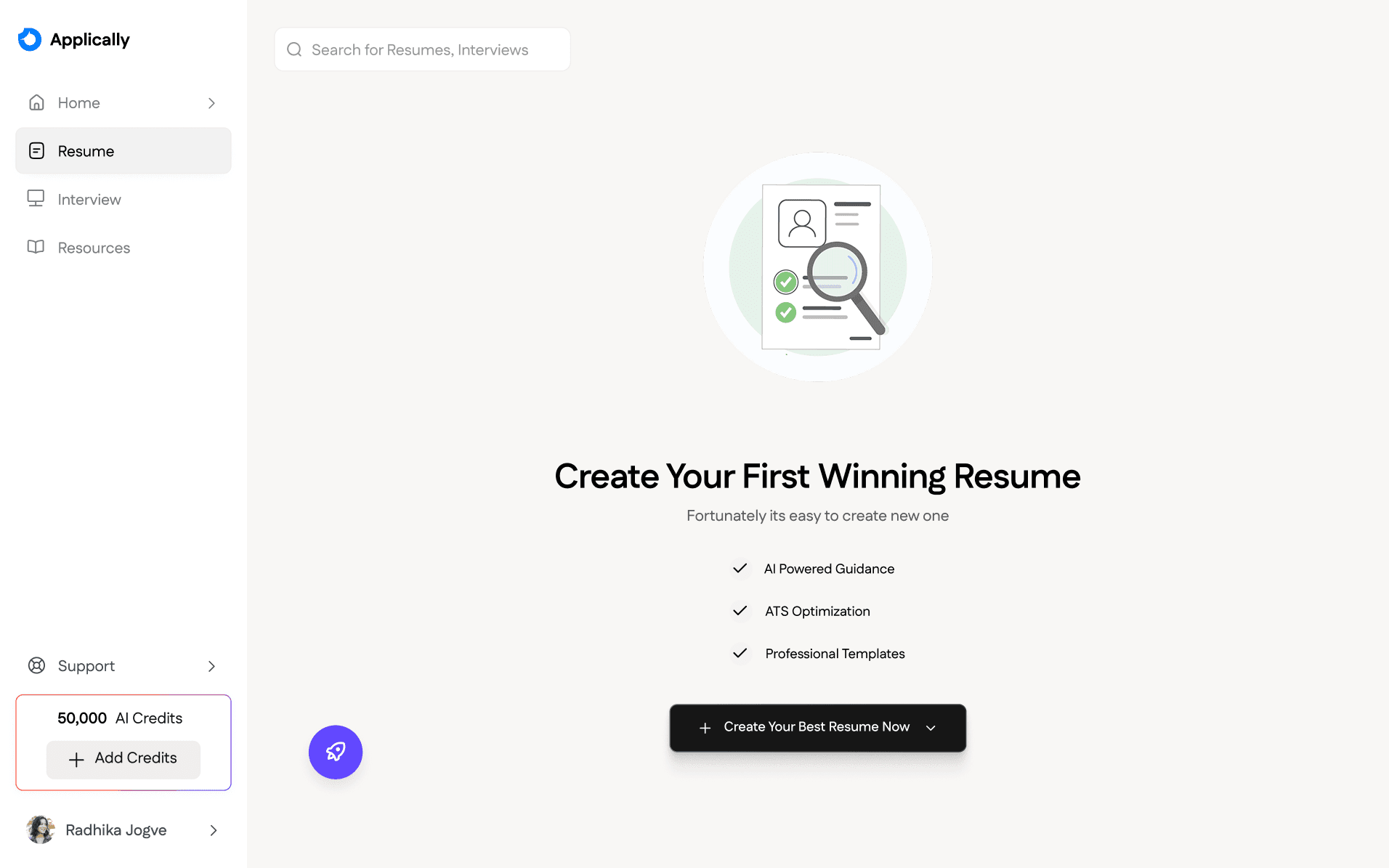
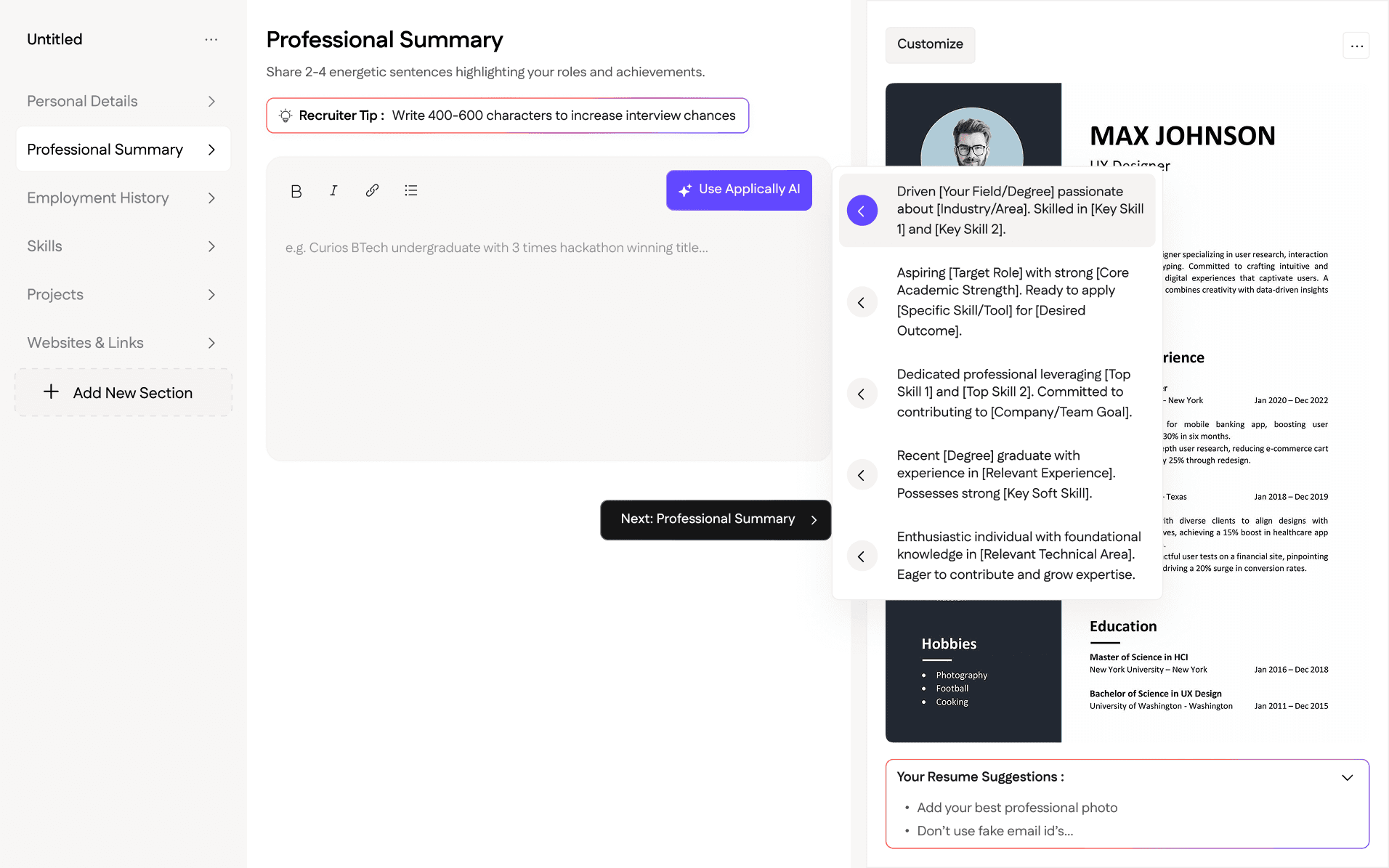
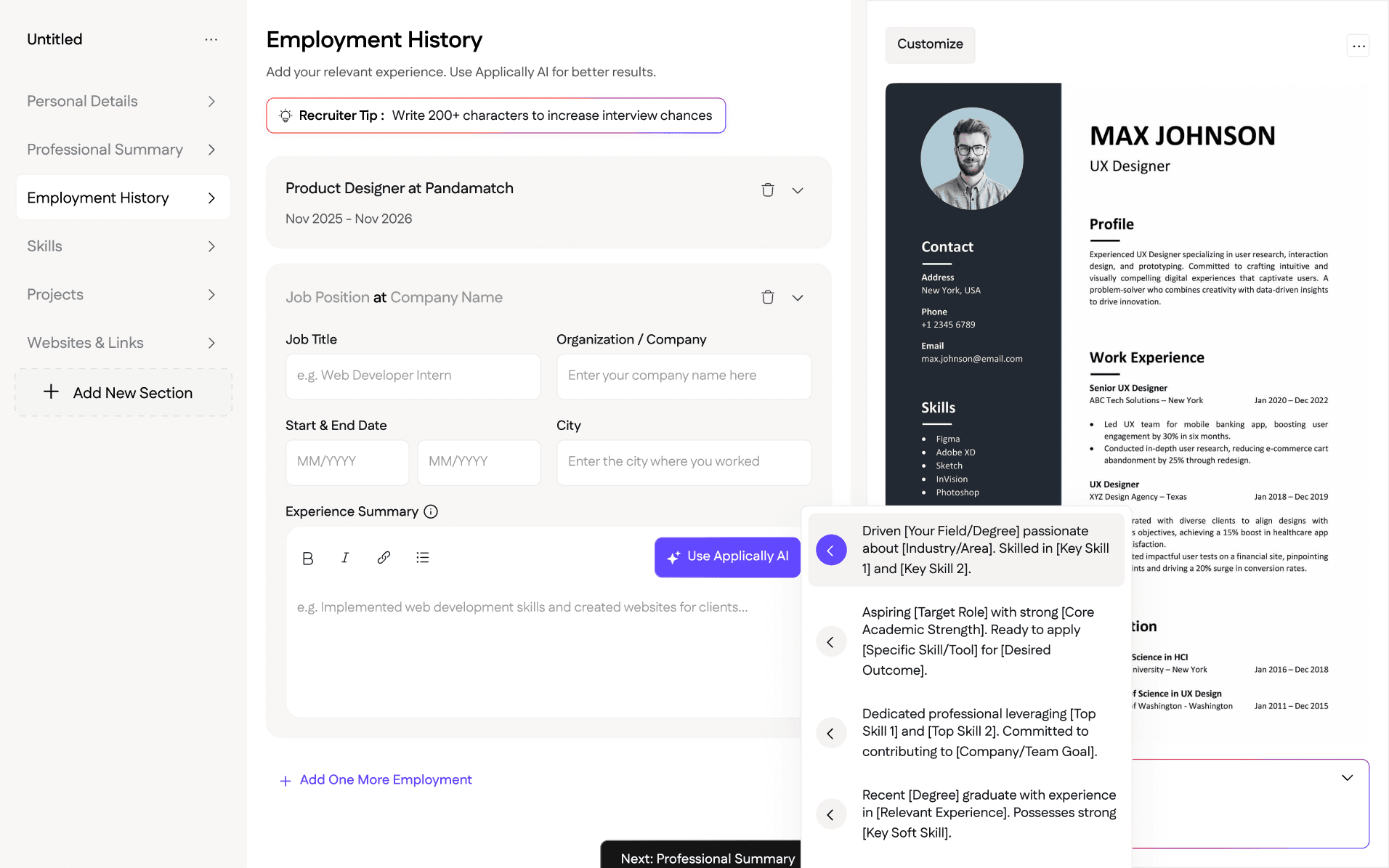
Student Side : Resume Creation Screens
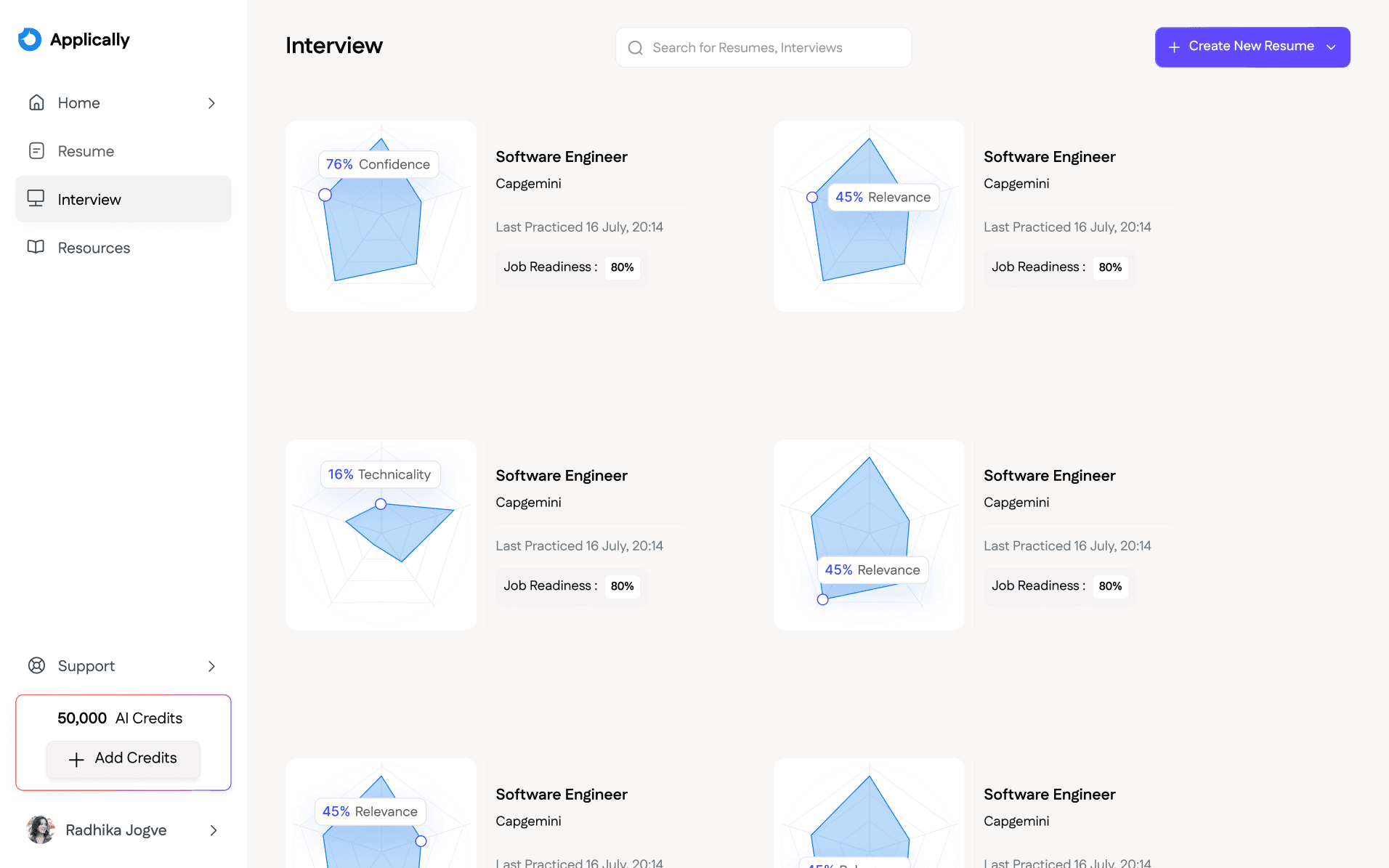
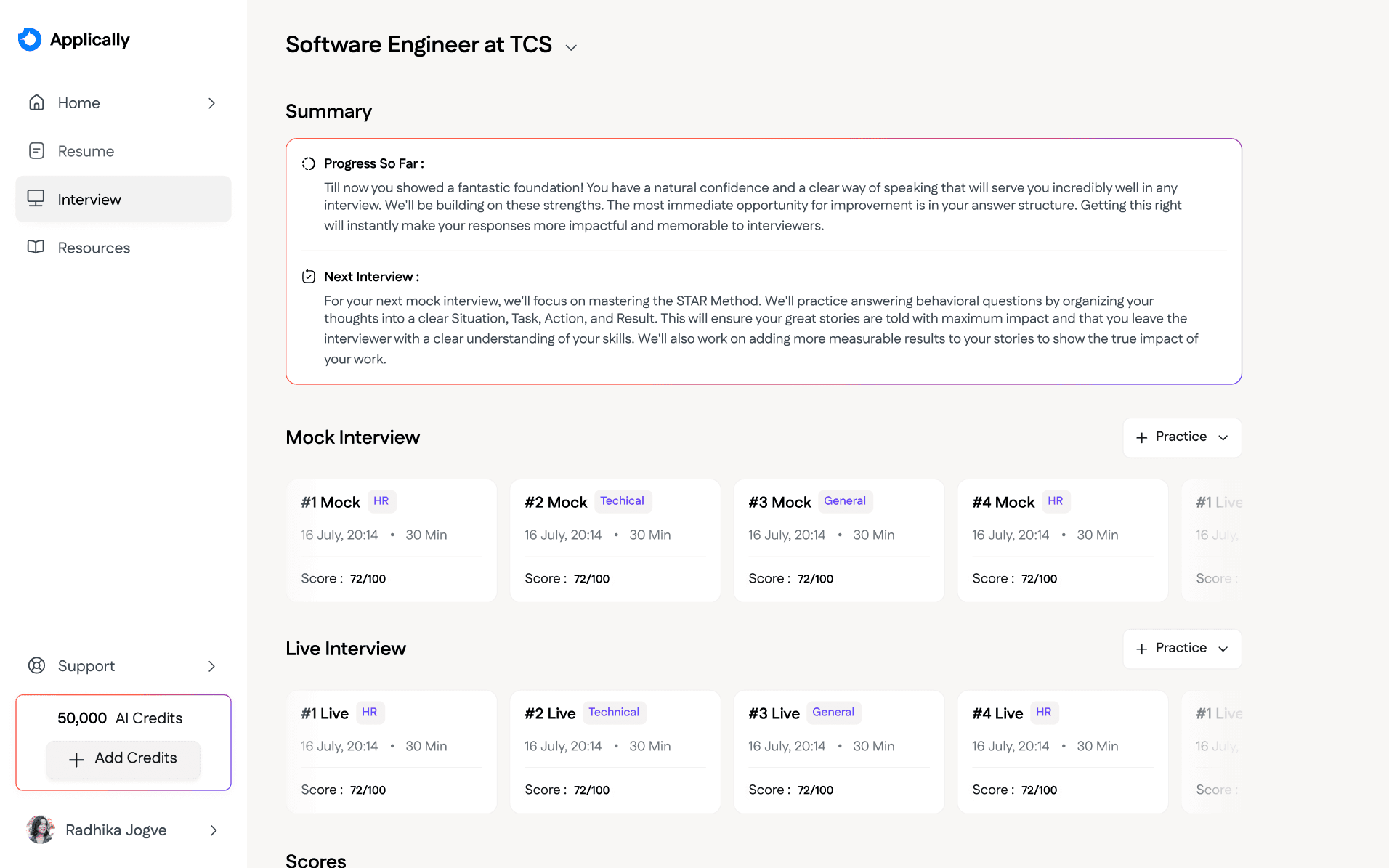
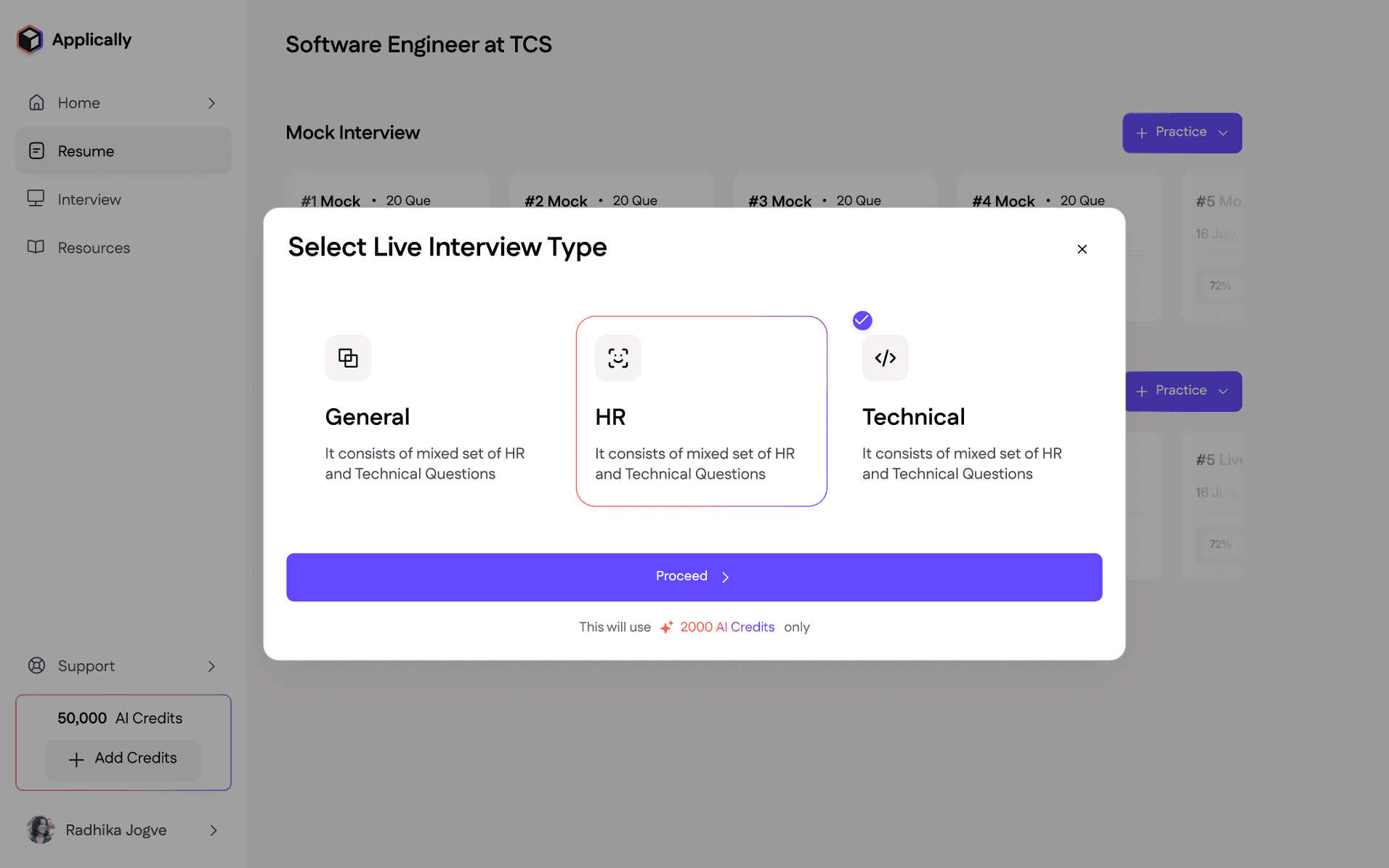
Student Side : Interview Practicing & Goals Screens
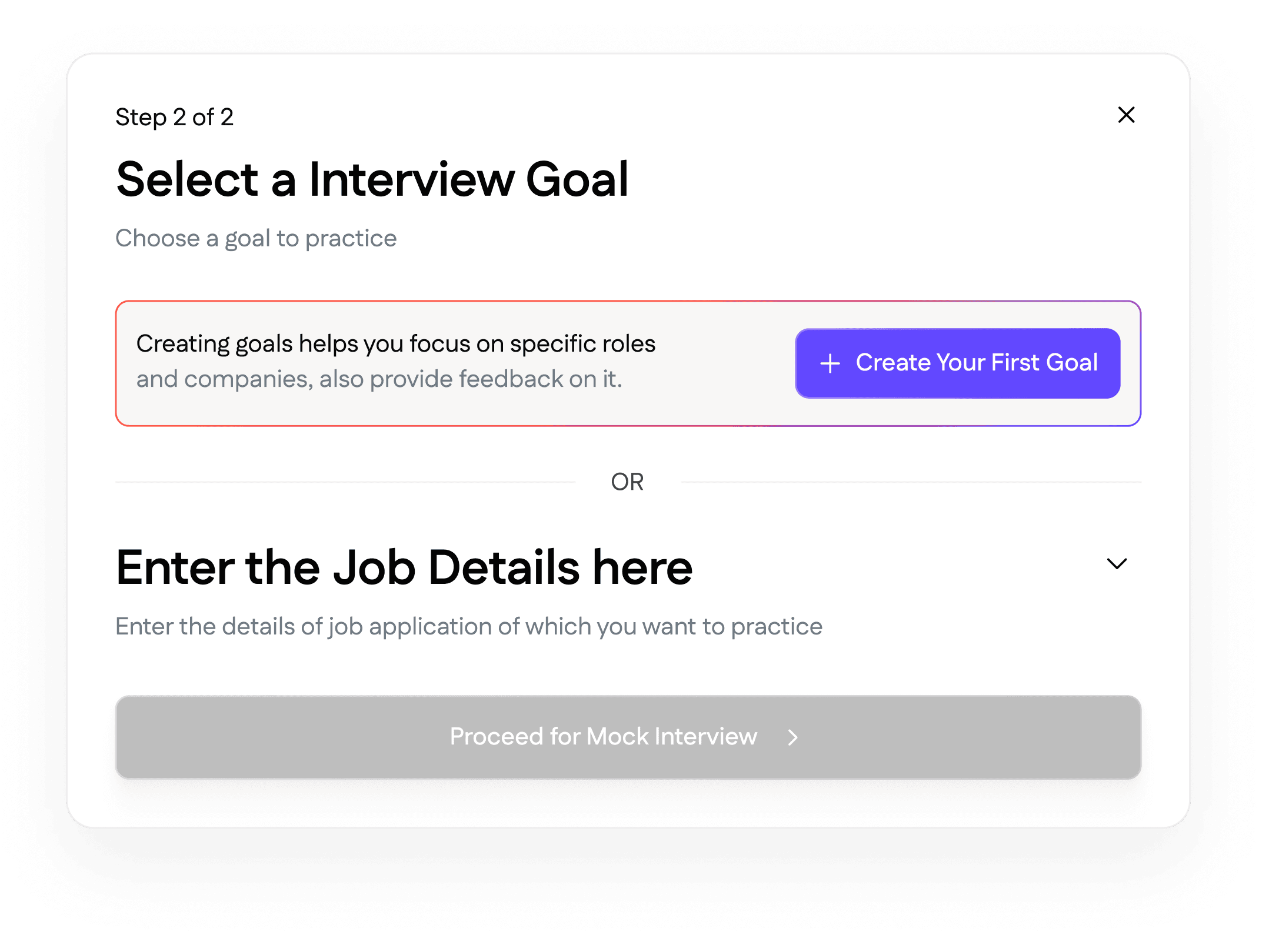
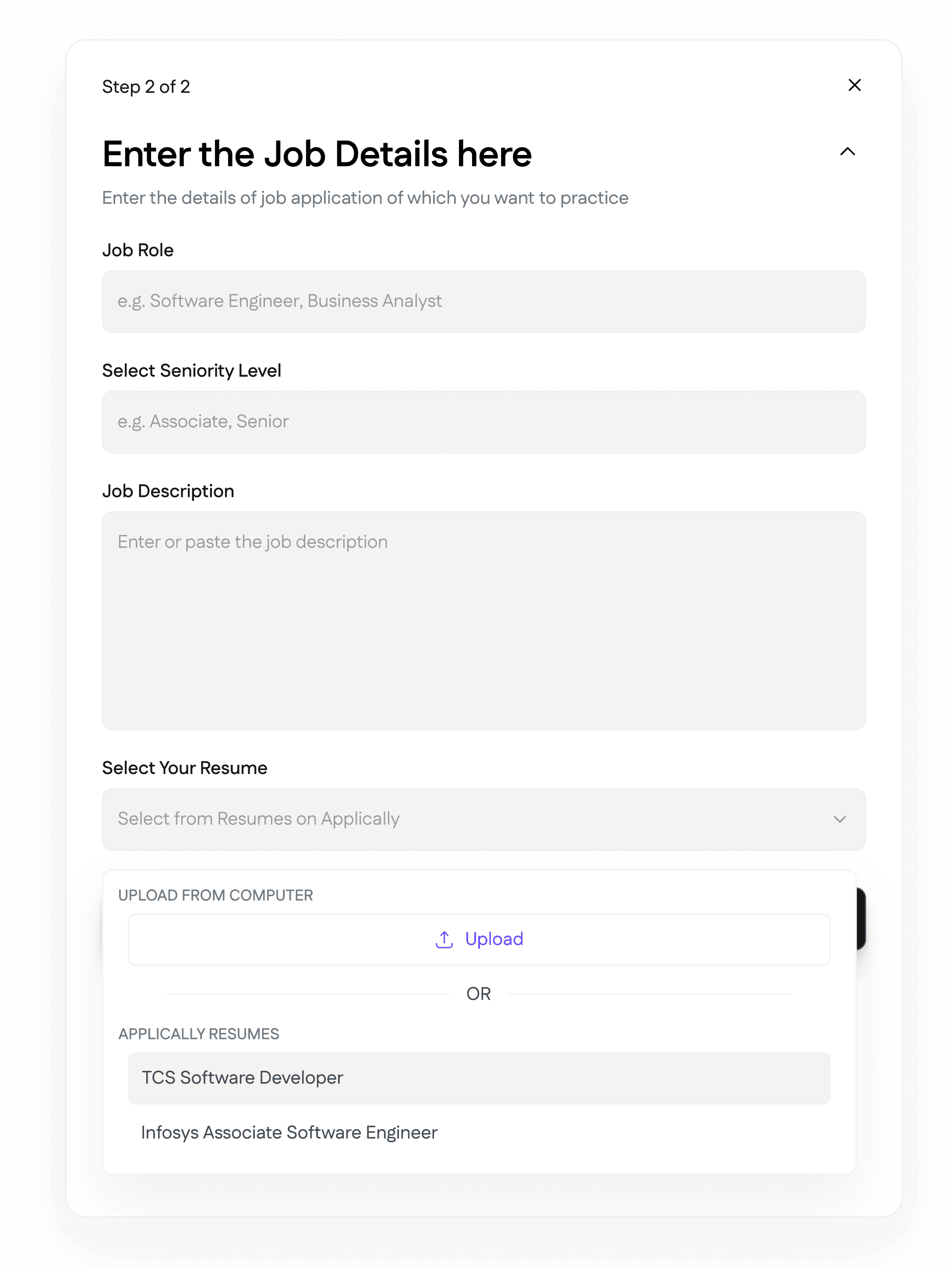
Student Side Pop-Ups
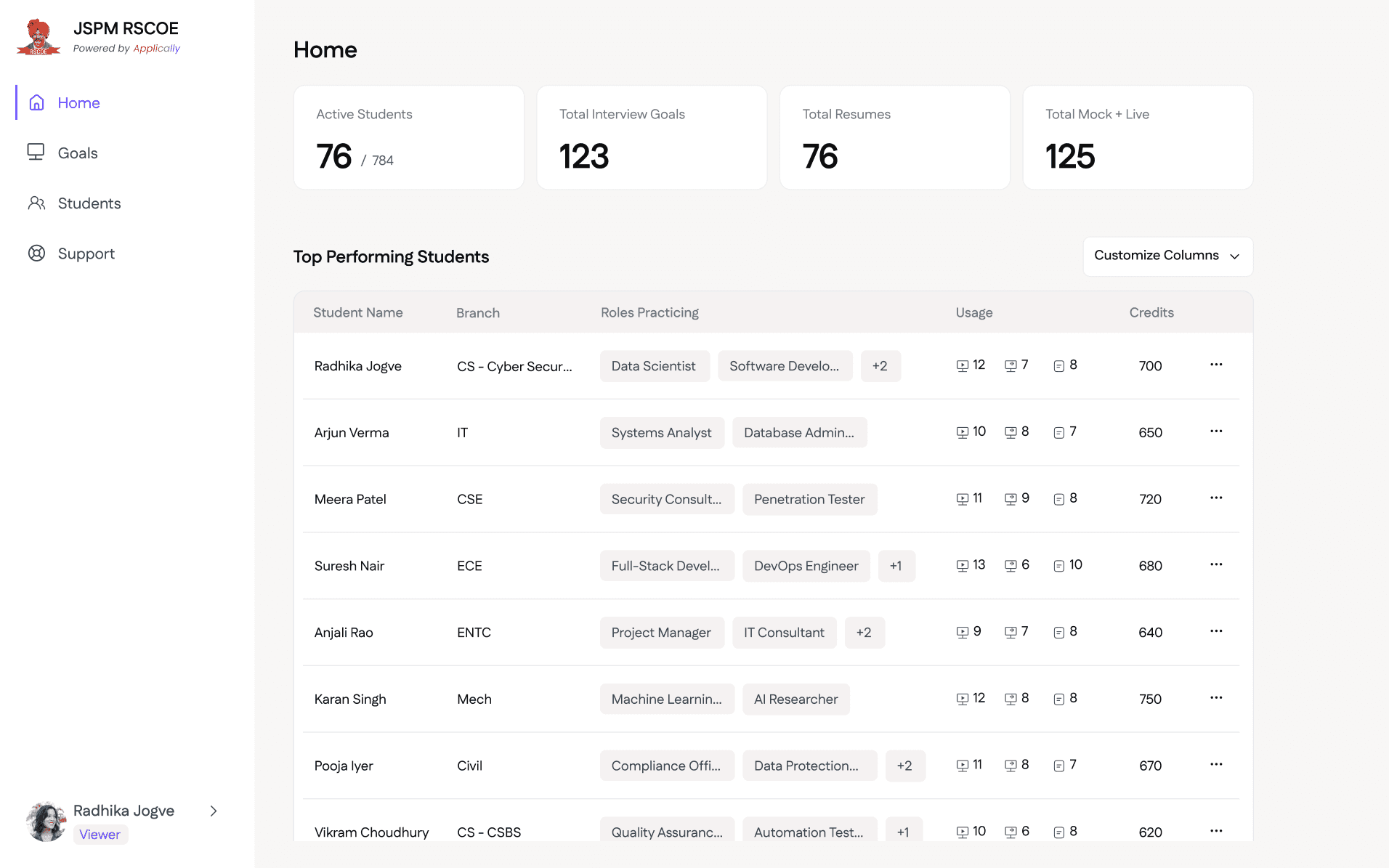
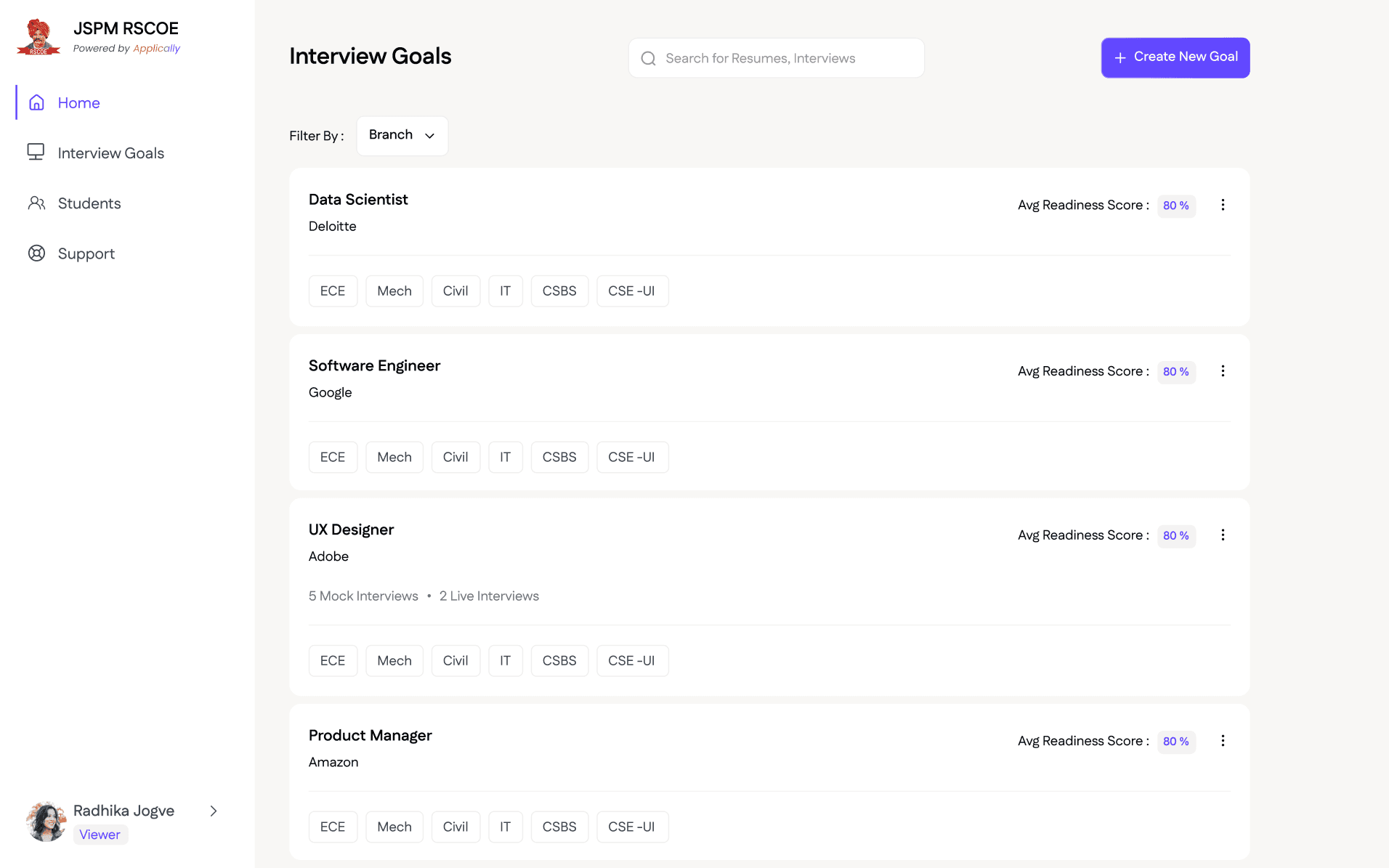
College Admin Side Screens
Results & Impact
AI as a UX Component :
I learned that AI shouldn't just be a "Chatbot" on the side. It must be woven into the inputs (Resume) and the outputs (Interview Feedback) to be truly valuable.
Scalability Architecting :
I designed the system to handle multi-tenancy (multiple colleges on one backend), ensuring that data privacy between different institutions was maintained at the UI level.
The "Constant Value" Dashboard :
By highlighting "Total Mock Interviews" and "Top Performers" on the home screen, we ensured that every time an admin logged in, they were met with data that shouted, "You made the right choice with TruSkill." This was intended for having higher contract renewal rates.
Reduction in "Support Fatigue :
By building the dedicated College Support Panel and "Self-Serve" credit tools, we reduced our internal team's manual intervention, allowing TruSkill to scale to more institutions.
Learning: The "Empty State" Strategy :
I realized that a student's first time on the platform is critical. I designed "Guiding Empty States" that actively prompted students to upload their first JD, ensuring the college saw immediate "Platform Usage" numbers.
Brief Context
TruSkill identified a massive friction point in the Indian education system: students have the degrees, but lack the "Interview Stamina" and "Resume Precision" required for high-tier placements. Applically was conceived not just as a tool, but as a simulated ecosystem.
My goal was to design a platform that could scale from a single user practicing in a dorm to a University Dean managing 5,000 students across 10 different engineering branches.
Challenges
Designing the "Proof of Value" Loop :
major challenge was ensuring that college deans didn't just buy the software but felt its impact daily. I had to design a dashboard that constantly surfaced the "TruSkill Value," making our worth visible through real-time improvements in student readiness.
The "Black Box" AI Problem :
Users often distrust AI feedback if they don't understand the "Why." I had to design a transparent feedback UI that didn't just give a score (e.g., 7/10) but broke it down into actionable pillars like Confidence, JD Alignment, and Grammatical Accuracy.
Architecting for Multi-Tenancy (B2B Scalability) :
Since we were selling to multiple colleges, the challenge was designing a global dashboard that could be white-labeled. I had to ensure that a Placement Officer at "College A" could never see data from "College B," while maintaining a unified Super-Admin view for our internal team.
Credit Friction vs. Business Logic :
Live interviews are resource-heavy. I had to design a "Smart Gate" system that prevented students from wasting expensive live credits until they had reached a certain "Readiness Score" in the free/low-cost mock interviews.
Bridging the Engagement Gap (Student Anxiety) :
Designing for students in a high-stress "placement season" meant the UI couldn't just be functional, it had to be encouraging.
Design Approach
AI-Assisted Resume Sculpting
We realized that the biggest hurdle in resume building isn't the layout—it’s the content.
I implemented a library of AI-generated bullet points focusing on "Quantifiable Achievements." Students could select a baseline point and the AI would help them customize it with their specific numbers.
The platform transitioned from a tool you use to a partner that tells you what to write, lowering the barrier for students who struggle with self-branding.
Interview Simulations
To manage backend costs and user anxiety, I designed a two-tiered interview system:
Mock Interviews (Low Friction): A "think-then-record" format that used fewer credits. I designed this as a training ground where users could see the question and respond when ready. This builds the "muscle memory" of answering.
Live Interviews (High Stakes): A real-time, AI-interactive session that simulated the pressure of a real interview.
JD-Tailored Questioning: I designed a flow where users upload a specific Job Description. The AI doesn't just ask general questions; it extracts "Required Skills" from the JD and grills the student on those specific gaps.
Readiness Scoring: After interview sessions, I designed a "Personalized Feedback Dashboard" that analyzed metrics like confidence, technical accuracy, and JD alignment. I implemented a numbering system (#1 Live, #2 Mock) to help users track their linear progress through an MVP-friendly interface.
Proving ROI through Analytics
Colleges need to see the "Value Add" to justify the software cost. I designed the Admin Dashboard for college admin to highlight:
Placement Readiness: An aggregate "Readiness Score" for each and every student.
Students Activity: Total resumes created vs. interviews practiced by students.
Top Performer Identification: Identifying "Placement-Ready" students based on AI-analyzed interview scores.
Credit Management & Targeted Placement
Colleges have limited budgets. I designed a Granular Assignment System that allowed administrators to:
Batch-Specific Goals: Create an "Amazon Prep" interview goal and assign it specifically to CS/IT students, preventing credit waste on irrelevant departments (e.g., Civil/Mechanical) for that specific drive.
White-Label Feeling: I prioritized the College's brand identity, giving their logo more visual weight than Applicly’s, making the platform feel like a proprietary resource owned by the institution.
Data-Driven Placement Strategy
For colleges, "Placements" is their biggest marketing metric. I designed an Executive Command Center that turns student activity into "Placement Intelligence."
The Readiness Matrix: A high-level scatter plot I designed that categorizes students into "Placement Ready," "Needs Polish," and "At Risk" based on their AI interview scores.
Granular Student Audits: Administrators can click into any student profile to see their "Interview Timeline." I designed a visualization showing their progress from Interview #1 to #10, proving that the platform is actually improving their confidence over time.
Scaling Support
To reduce TruSkill's internal support load, I designed a Client Support Panel within the college dashboard. This allowed administrators to log queries and track tickets directly, ensuring we could manage multiple institutions without a constant reliance on phone calls.
Solutions
The Path to Readiness :
I designed the UX to be "Goal-Oriented." A user doesn't just "take an interview"; they enter a Job Description (JD), and the AI builds a "Path" of tailored questions.
The Landing Page :
I designed the full product landing page, focusing on the bridge between "Education" and "Employment," using a clean, modern aesthetic.
Feedback Visualization :
I designed a "Radar Chart" for post-interview analysis. It measured five pillars: Technical Knowledge, Communication, Confidence, Body Language, and JD Alignment. This gave students a "Level Up" feeling similar to a video game.
The Support Ecosystem :
I designed an Integrated Ticketing System for colleges. Instead of an external email, I built a "Support Tab" where deans could report technical glitches or request credit top-ups, which were then funneled into our Super-Admin panel for 1-click resolution.
Student Side : Resume Creation Screens
Student Side : Interview Practicing & Goals Screens
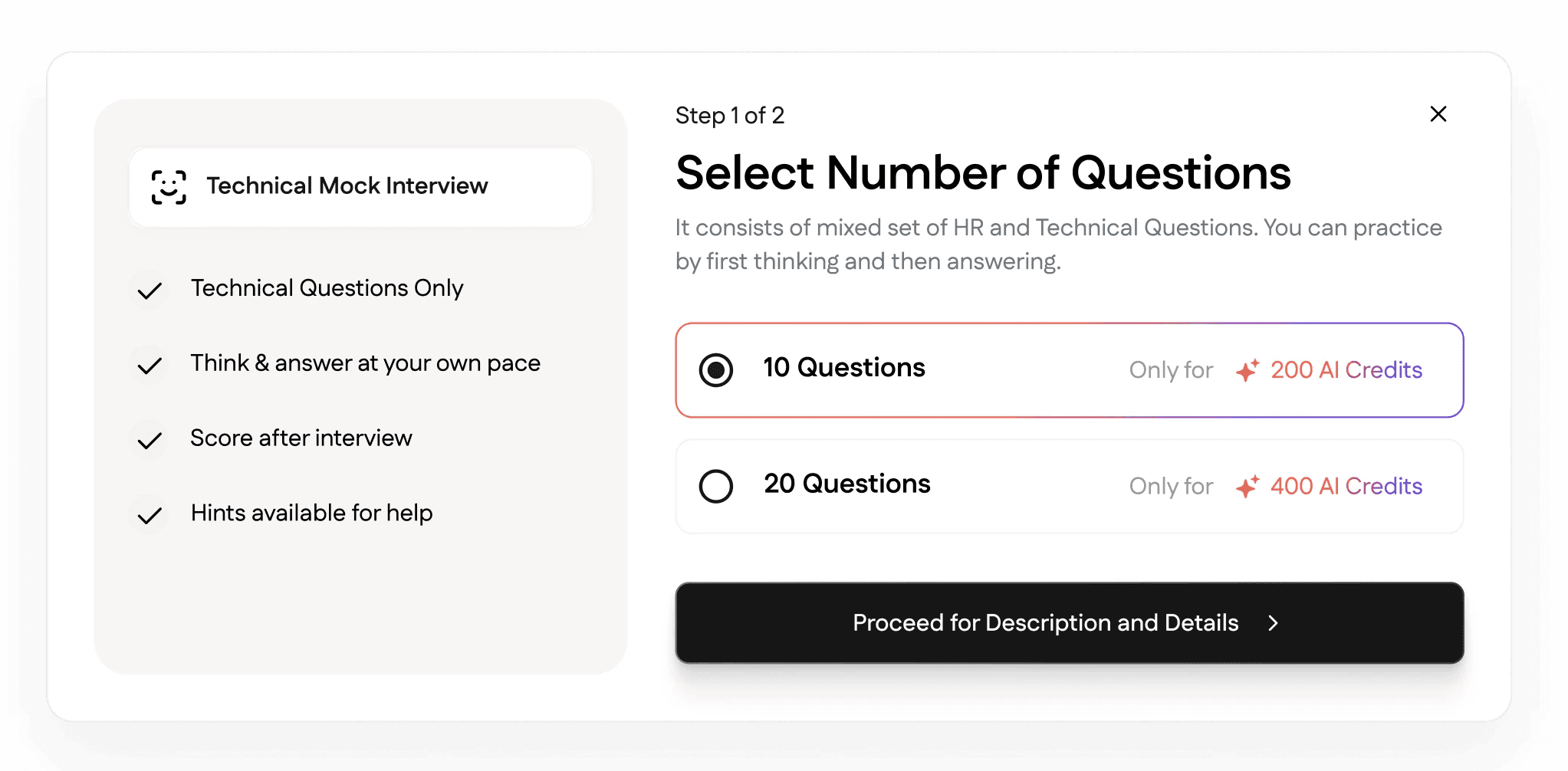
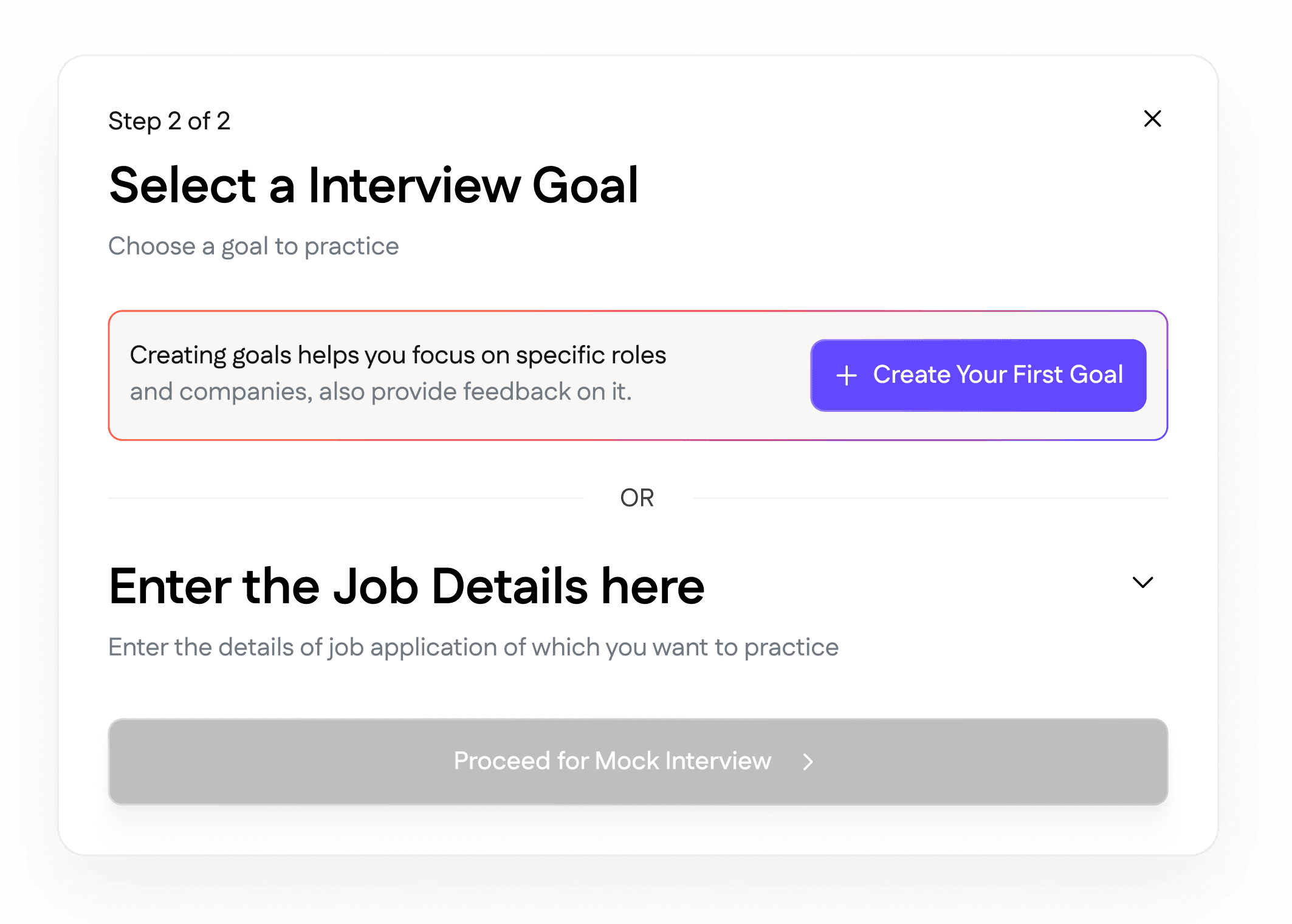
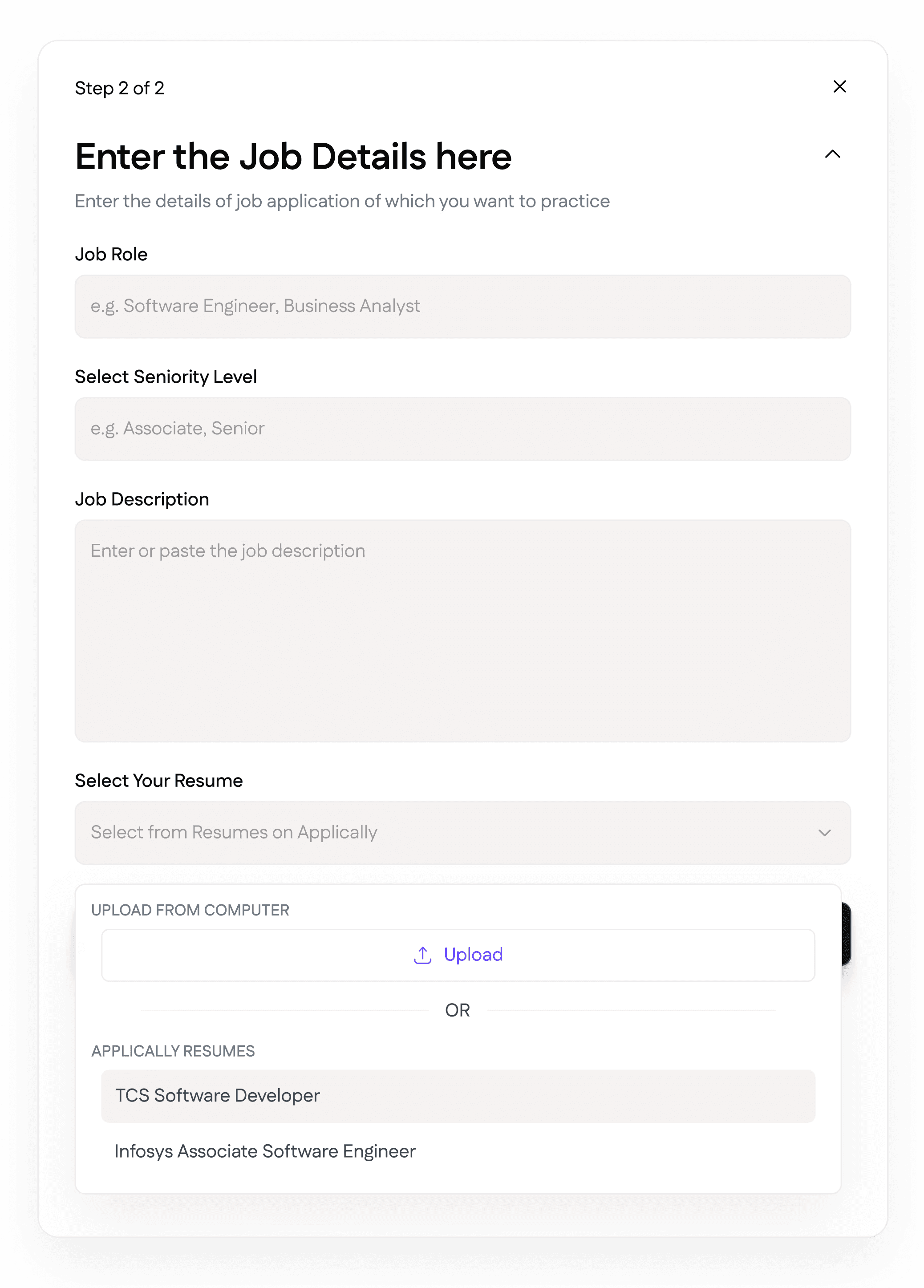
Student Side Pop-Ups
College Admin Side Screens
Results & Impact
AI as a UX Component :
I learned that AI shouldn't just be a "Chatbot" on the side. It must be woven into the inputs (Resume) and the outputs (Interview Feedback) to be truly valuable.
Scalability Architecting :
I designed the system to handle multi-tenancy (multiple colleges on one backend), ensuring that data privacy between different institutions was maintained at the UI level.
The "Constant Value" Dashboard :
By highlighting "Total Mock Interviews" and "Top Performers" on the home screen, we ensured that every time an admin logged in, they were met with data that shouted, "You made the right choice with TruSkill." This was intended for having higher contract renewal rates.
Reduction in "Support Fatigue :
By building the dedicated College Support Panel and "Self-Serve" credit tools, we reduced our internal team's manual intervention, allowing TruSkill to scale to more institutions.
Learning: The "Empty State" Strategy :
I realized that a student's first time on the platform is critical. I designed "Guiding Empty States" that actively prompted students to upload their first JD, ensuring the college saw immediate "Platform Usage" numbers.
Vineeत्
